
Your RAM 1500 has a large tailgate and limited rear visibility. That makes parking, reversing, and trailer hitching harder in tight spaces.
A RAM 1500 backup camera helps you see obstacles behind your truck. However, your factory screen may not support every aftermarket camera.
Before upgrading, check your truck’s model year and existing equipment. You should also consider camera placement, monitor options, and towing needs.
These four tips will help you choose a suitable upgrade. You’ll also discover TadiBrothers systems that support different truck setups.
Can You Upgrade Your RAM 1500 Backup Camera?
Yes, you can add or upgrade cameras on many RAM 1500 trucks. However, the right solution depends on your model year and equipment.
For example, the 2018 RAM 1500 came with standard ParkView backup cameras. The newer RAM 1500 arrived for 2019 alongside the previous-generation Classic.
RAM continued selling the 1500 Classic until production ended in 2024. These trucks may require different mounting hardware and factory display connections.
Here’s what you should check before choosing your camera.
| RAM 1500 model | What you should know |
| 2013–2017 RAM 1500 | Check whether your truck has a factory camera and compatible display. |
| 2018 RAM 1500 | Standard ParkView camera; verify your existing equipment before upgrading. |
| 2019–2024 RAM 1500 Classic | Uses the previous-generation design; check its specific factory connections. |
| 2019 and newer RAM 1500 | Check your Uconnect system and existing camera before adding equipment. |
A separate-monitor kit can avoid complicated factory display connections. However, aftermarket accessories still require proper mounting and electrical installation.
Tip 1. Check Your Factory Camera and Uconnect Screen
Start by checking whether your factory backup camera works properly. You may not need to replace the entire system.
Park safely, select reverse, and inspect your existing camera image. Look for flickering, distorted images, or a completely black screen.
If your factory camera works, decide what you want improved. You might prefer another viewing angle or continuous trailer monitoring.
Can You Connect an Aftermarket Camera to Uconnect?
Your factory Uconnect display may need a vehicle-specific camera interface. Different model years can use different connectors, voltages, and video formats.
Check these details before purchasing an aftermarket camera:
- Your RAM 1500 model year and trim level.
- Your existing Uconnect display and camera input.
- The camera connector and supported video format.
- Any adapters required for factory-screen integration.
A universal camera cannot always connect directly to your factory screen.
If compatibility seems uncertain, consider a dedicated aftermarket monitor.
The TadiBrothers License Plate Backup Camera with 7-Inch Monitor offers an independent display.
Its supplied monitor receives video without relying on factory Uconnect integration. You can also connect a compatible second camera to this monitor.
Tip 2. Choose the Right Camera Mount for Your Tailgate
Your camera’s position affects what you can see while reversing. For RAM 1500 trucks, consider the tailgate and license plate locations.
Tailgate Backup Cameras
Factory RAM 1500 cameras commonly sit near the tailgate handle. This location provides a useful view behind your truck.
However, lowering the tailgate changes the camera’s viewing direction. Removing the tailgate can also disconnect your existing camera.
That matters when transporting long cargo or using certain truck accessories.
Before replacing your tailgate camera, check its mounting and wiring. You should also confirm the replacement supports your model year.
License Plate Backup Cameras
A license plate camera offers another mounting option for your truck. It usually attaches using the existing license plate mounting holes.
A bumper-mounted license plate camera also stays positioned when you lower the tailgate. However, check that your bumper and trailer equipment do not obstruct it.
The TadiBrothers 7-Inch Wired License Plate Camera System includes an adjustable camera.
Its weatherproof design and automatic night vision support everyday rear viewing.
What If You Frequently Tow a Trailer?
Position your camera to show the hitch and nearby ground. This helps you judge alignment while approaching your trailer coupler.
A camera behind your truck cannot see through an attached trailer. You may need another camera mounted near the trailer’s rear.
Before drilling or mounting equipment, test your intended viewing angle.
Tip 3. Choose Between Wired and Wireless Camera Systems
Both wired and wireless cameras can improve your RAM 1500’s rear visibility. Your choice depends on installation preferences and how you use your truck.
Wired Backup Cameras
A wired camera sends video through a physical cable connection. You don’t need wireless transmission between the camera and monitor.
However, routing the cable takes careful planning and proper protection.
The TadiBrothers wired license plate system includes a 15-foot cable. Measure your complete cable route before assuming this length will fit.
Your route should avoid exhaust heat, sharp edges, and moving parts.
Wireless Backup Cameras
Wireless backup cameras transmit video without a full-length video cable. However, your camera and monitor still need electrical power.
TadiBrothers offers a 7-Inch Wireless Mirror Backup Camera for Trucks.
This system includes several useful features for RAM 1500 drivers:
- A 7-inch clip-on mirror monitor for rear viewing.
- A 120-degree camera viewing angle for better coverage.
- Automatic night vision for driving in darker conditions.
- A manufacturer-rated wireless transmission range of 70 feet.
- Support for two compatible cameras on the same monitor.
You can add a compatible second camera for trailer monitoring. This offers another view beyond your truck’s rear bumper.
Actual wireless performance depends on distance, interference, and mounting conditions.
Which Camera System Should You Choose?
| Your driving needs | Suitable system |
| Basic reversing | Wired license plate camera with 7-inch monitor |
| Less video cable routing | Wireless license plate camera with mirror monitor |
| Regular trailer towing | Compatible two-camera system with trailer-mounted camera |
| Continuous rear observation | Camera and monitor supporting continuous viewing |
Choose a system based on your actual driving and towing needs. You should also verify its mounting space and electrical requirements.
Tip 4. Check Wiring, Power, and Camera Performance
Incorrect wiring can cause problems even with a compatible backup camera. Check the camera’s power requirements before connecting anything.
You should also decide when your camera needs to operate.
Reverse-Only vs. Continuous Viewing
Reverse-only systems display the camera image when you select reverse gear. Your installation may use a reverse trigger and suitable power connection.
Continuous viewing lets you monitor the rear while driving forward. You need compatible equipment and the correct power setup.
Never assume factory wiring uses the same voltage as aftermarket equipment.
Basic Installation Checklist
Follow these checks before completing your RAM 1500 camera installation:
- Verify your camera and monitor have matching electrical requirements.
- Identify suitable power, ground, and reverse trigger connections.
- Measure and protect your complete camera cable route.
- Keep wires away from tailgate hinges and sharp edges.
- Test every connection before reinstalling your truck’s interior panels.
Check your camera image with the truck safely parked. Adjust the viewing angle until nearby obstacles become easier to see.
For detailed instructions, use the manufacturer’s wiring and installation guides.
Common RAM 1500 Backup Camera Problems
Your camera’s symptoms can help you identify possible wiring or display issues.
| Problem | Possible cause | What you should check |
| Black screen | Missing signal or power | Camera power, monitor, and wiring |
| Flickering image | Loose or damaged wiring | Tailgate harness and connectors |
| Blurry image | Dirty lens or moisture | Lens condition and camera housing |
| Camera not activating | Reverse trigger problem | Wiring and monitor settings |
| Image disappears with tailgate movement | Damaged or stretched harness | Tailgate wiring and connection points |
Check for RAM 1500 Backup Camera Recalls
Some RAM 1500 models have experienced rear camera display problems. Certain recalls involve radio software rather than faulty camera hardware.
For example, some 2022 RAM 1500 trucks were included in camera-related recalls. Certain 2026 RAM 1500 vehicles are also covered by recall 78D.
You should check your VIN before purchasing a replacement camera.
Use the official Mopar Recall Lookup to check your truck.
If your vehicle has an open recall, contact an authorized dealer. Repairing the existing system may resolve the issue without another camera.
Which TadiBrothers Backup Camera Fits Your RAM 1500?
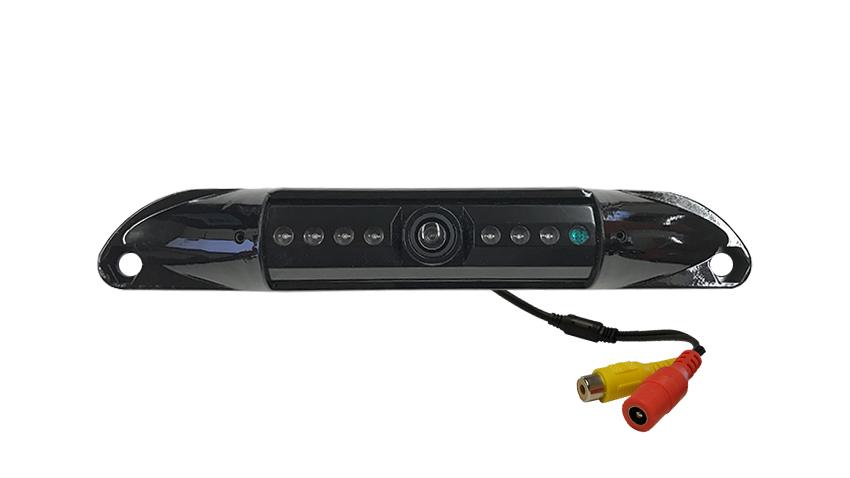
TadiBrothers offers camera systems for different pickup truck applications. Choose your system based on viewing needs and installation requirements.
For Everyday Reversing
The 7-Inch Wired License Plate Camera System provides a dedicated rear display.
It includes a weatherproof camera, night vision, and installation cables.
For Wireless Rear Viewing
The 7-Inch Wireless Mirror Camera System reduces long video cable routing.
Its clip-on monitor also supports a compatible second camera.
For Trailer Monitoring
Consider a compatible multi-camera setup when towing larger trailers. A separate trailer camera can show areas your truck camera cannot.
Browse TadiBrothers Truck Backup Camera Systems to compare suitable options.
These aftermarket systems are not guaranteed factory Uconnect replacements. Always verify the specific camera, mounting, and power requirements first.
Final Thoughts
Upgrading your RAM 1500 backup camera starts with checking factory compatibility. You should also consider tailgate movement, trailer visibility, and wiring requirements.
A separate-monitor system can simplify many aftermarket camera installations. TadiBrothers offers wired, wireless, and multi-camera options for different needs.
Explore TadiBrothers Backup Camera Systems to find an option for your truck.
Frequently Asked Questions
Can You Add an Aftermarket Backup Camera to Your RAM 1500?
Yes, you can add aftermarket cameras to many RAM 1500 trucks. A separate-monitor system may simplify installation when factory-screen compatibility remains uncertain.
Will a TadiBrothers Backup Camera Work With Uconnect?
Not automatically, because factory displays may require vehicle-specific camera adapters. You should verify your exact Uconnect system before choosing factory-screen integration.
Can You Use a Backup Camera With Your Tailgate Down?
Yes, if your camera remains properly positioned outside the moving tailgate. A bumper-mounted license plate camera may provide a more consistent view.
Can You Keep Your Backup Camera On While Driving?
Yes, some TadiBrothers systems support continuous rear viewing while driving. However, you must install compatible equipment with a suitable power connection.