
A dash cam G-sensor can spot a hard jolt and protect key video. If another car hits yours, you may have no time to react. Your camera can mark the clip while you deal with the road. That small feature may save you a long search later.
But a sensor alone will not film every hit or scrape. You need the right power, camera view, and file settings too. TadiBrothers sells camera systems for cars and work trucks. Here is how to pick features that suit your daily drive.
What Is a Dash Cam G-Sensor, and How Does It Work?
A G-sensor feels a sudden shift in force as your car moves. Think of a hard stop, a sharp bump, or a crash. When the force meets the set level, some cams mark that clip. This helps keep the file safe from normal loop recording.
Here is what takes place on most cams with event lock:
- A jolt occurs. The sensor picks up a quick change in motion.
- The cam flags the event. Its software marks or locks the clip.
- You review the file. You find it in the event folder later.
That does not mean the sensor knows who caused the hit. It only senses force, not the full scene around your car. A light scrape may fail to set it off at all. Your camera must also be on, or have a working park mode.
G-Sensor vs. Motion Detection vs. Parking Mode
These terms sound alike, but they do different jobs. You may see all three on a dash cam box. Knowing the gap can stop you from buying the wrong kit. Here is a quick way to tell them apart.
| Feature | What starts it | When it helps |
| G-sensor | A hard jolt or change in force | Marks footage from a hit or harsh stop |
| Motion detection | Movement seen by the lens | Spots people or cars within camera view |
| Parking mode | A camera setting for a parked car | Lets the cam watch for events while parked |
Parking mode is a way the camera runs, not a sensor. Some models use both motion and impact to start recordings. Others record at a low rate until an event occurs. Check the exact mode before you rely on it overnight.
5 Key Benefits of a Dash Cam G-Sensor
1. Save a Key Clip When You Need Both Hands
No one plans a crash during the ride to work. You may brake hard as a car cuts across your lane. Your hands belong on the wheel, not the dash cam. An impact sensor can flag the clip without your help.
This is handy when the road gets tense in seconds. Yet a mild side scrape might not meet the set limit. Look for a cam with a manual save control too. That gives you a way to keep clips the sensor misses.
2. Protect Event Files From Loop Recording
A dash cam can’t keep every drive on one card. Most models record short clips and replace the oldest ones. That keeps your storage free for the next trip. The trouble starts when a clip you need gets erased.
Event lock helps keep marked clips out of that normal cycle. But protected space can still fill up on some models. A full or worn card may also cause lost files. Copy key footage to your phone or laptop soon after a hit.
3. Catch Some Bumps While Your Car Is Parked
You leave your car outside a store for twenty minutes. When you return, there is a fresh mark on the door. Would your cam have filmed what took place? Only if its park features and power setup allow it.
A dash cam G-sensor can help spot a parked impact. Still, the cam must stay ready once you turn off the car. Some kits need a hardwire lead or a spare battery pack. Ask if the model saves footage from before the hit too.
Buying tip: Look for low-voltage cutoffs to protect your car battery. Also check whether the camera records while it waits for events. A hit to the side may not appear in either lens. A sensor alert is not the same as a clear video.
4. Find Useful Footage Without Hours of Searching
Imagine a long day in a delivery van. You cross town, hit rough streets, and make ten stops. At home, you recall one loud bang near a curb. Which of the day’s clips should you check first?
Event folders give you a place to start. Some cams tag each event with the date and time. That makes it easier to match a clip to your route. Still, lots of false alerts can fill that folder fast.
Buying tip: Check how you view and share saved files. A clear menu matters more than a long list of extras. If you run a fleet, ask about camera and recorder access. You want files you can find when the day ends.
5. Add More Context With Front and Rear Views
A hard jolt can come from any side. One front lens will not show what happens behind you. That’s a gap if a driver hits your rear bumper. Two camera views can help you piece together the scene.
Picture a car tailing you on a wet road. You slow for traffic, then feel a bump from behind. The front view shows why you had to stop. A rear view may show how close that car was.
Buying tip: Ask if an event saves both camera views. Not all two-camera systems lock files the same way. Check day and night samples, not just the claimed resolution. Clear plates and road signs are worth more than hype.
What Is the Best G-Sensor Sensitivity Setting?
The best setting is one that catches real hits. It should not lock a file at every small pothole. Start with the camera maker’s default or suggested level. Then check how it acts on your usual roads.
| Setting | When it may help | What to watch for |
| Low | Rough roads and daily driving | Small hits may not trip the sensor |
| Medium | A good place to start, if the guide agrees | Some bumps may still lock clips |
| High | Park mode on supported cams | More false alerts from small shakes |
A dash cam G-sensor does not need the same setting everywhere. Some models let you set driving and parking levels apart. High park sensitivity can help catch smaller bumps, but not always. The right choice comes from your user guide and a real test.
Want to check your settings without taking risks? Drive your normal route and review the event folder. See if speed bumps have filled it with locked clips. If so, lower the level as your guide allows. Never strike your car to test whether the feature works.
How to Choose a Dash Cam G-Sensor Setup
Your first question should be, “What do I need to see?” A daily driver may need just front and rear views. A work truck might need views of the sides too. The right kit depends on your route, not a flashy label.
Before you buy, check these five points:
- Video quality: Can you make out key details in low light?
- Event files: Does the cam lock clips and show them clearly?
- Storage: Does it take a high-endurance card with enough room?
- Park power: Can it stay on without draining your battery?
- Camera views: Does it show the spots where risk is highest?
Don’t stop at the product photos or spec sheet. Read the guide for setup, file limits, and power needs. Ask what parts are in the box and what costs extra. Those answers can spare you an install headache.
Which TadiBrothers Camera System Fits Your Needs?
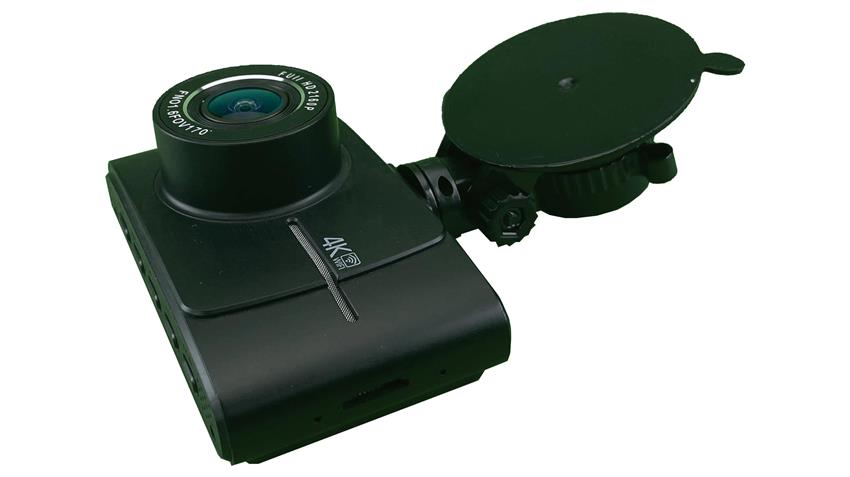
If you want front and rear footage, compare the TadiBrothers 4K Dash Camera with Backup Camera USB-C. Its product page lists a rear camera for accident recording. That makes it one option to review for daily driving.
For work trucks, look at the TadiBrothers 4-Channel Smart MDVR Recorder. Its listing notes four 1080p video channels and G-sensor integration. The recorder is made for fleet setups, not just daily commutes. Check which cameras, sensors, and parts come with your package.
You can also browse TadiBrothers’ dash cam range for other setups. But choose based on the view and features you need. A top-end screen won’t help if the event file gets lost. What matters is a clip you can view and save.
How Do You Find and Save a Locked Video?
After a road event, move to a safe place first. Then check for a lock icon or an event folder. The file name may vary from one cam to the next. Your user guide will show where the files are kept.
Before you drive more, save a copy when safe. Use the app, card reader, or USB link your model supports. Keep the first file as it came from the camera. Make a second copy before you share or trim it.
If you find no event clip, check the normal files. The cam may have filmed the road without sensing much force. You may still find a view of what happened. Don’t format the card until you have checked and saved it.
Protect Important Footage
A good dash cam G-sensor setup needs more than impact detection. You need clear views, good power, and files you can find. TadiBrothers has camera choices for personal and work vehicles. If your next drive brings a sudden hit, what would your camera save?
Dash Cam G-Sensor FAQs
Does It Work When Your Car Is Turned Off?
Not by itself, since the camera still needs power. Your model must support park mode and a safe power source. Check the guide before you leave it on all night.
Can a Speed Bump Set It Off?
Yes, a sharp bump may look like an event. If this happens often, review the sensitivity level. Check the event folder so needless locks do not pile up.
Does a Dash Cam G-Sensor Record Before a Crash?
Some cams save a few seconds from before an event. This is often called buffered recording or pre-event video. It is not built into every camera or mode. Check the exact model before you count on it.
Can You Use Event Footage for a Claim?
A clear clip may help show what took place. Keep the original file, date, and time when possible. It may not show every angle or settle every dispute.