
When you buy a backup camera system you need to have the right wiring harness to work properly as well. If you end up with a mismatched connector it can leave you with a blank screen. Incorrect power connections may also cause flickering or unexpected camera shutdowns.
When you’re buying a backup camera wiring harness, check five things. These include connector compatibility, cable length, power requirements, cable protection, and testing.
You should also check whether your camera supports your monitor. These five fitment tips will help you avoid common wiring mistakes.
What Is a Backup Camera Wiring Harness?
A backup camera wiring harness connects your camera, monitor, and power source. It carries video signals, electrical power, or both through suitable cables.
Your system may use several types of wiring connections:
- Power wires supply electricity to your camera.
- Video cables send images to your monitor.
- Reverse trigger wires activate the display when you shift into reverse.
- Ground wires complete the electrical circuit.
- Connectors join compatible cables and system components.
Not every camera harness uses the same wiring or connector design. You must match these parts before starting your installation.
1. Match Your Backup Camera Harness Connectors
Start by checking the connector on your camera and monitor. Most aftermarket wired systems use RCA or 4-pin aviation-style connections.
Here’s how these connectors differ.
| Connector type | Common use | What you should check |
| RCA | Car cameras and aftermarket displays | Video input and separate power requirements |
| 4-pin aviation | Trucks, RVs, and heavy-duty cameras | Pin layout and locking connector compatibility |
| Factory connector | Original vehicle camera systems | Vehicle-specific harness and voltage requirements |
RCA vs. 4-Pin Backup Camera Connectors
An RCA backup camera cable usually has a yellow video plug. Your camera may also need a separate DC power connection.
A 4-pin backup camera connector can carry power and video together. Its locking design helps keep the cable secure during vehicle movement.
However, matching connector shapes do not always mean matching wiring layouts.
Before purchasing your harness, check these details:
- Confirm both connectors have compatible male and female ends.
- Match the connector pinout with your camera’s wiring diagram.
- Check whether your camera uses standard video or AHD.
- Verify that your monitor supports the camera’s video format.
TadiBrothers offers a 4-Pin to RCA Connector for compatible systems. Its adapter includes RCA video and a 12V DC barrel connection.
Remember, changing connectors does not automatically convert the video format.
Can You Use a Factory Backup Camera Harness?
You may need an additional adapter when replacing factory camera equipment. Some original systems use proprietary connectors or different power voltages.
Check your vehicle’s year, model, and original camera specifications first. Never connect a 12V supply without confirming the camera’s requirements.
2. Measure Your Backup Camera Cable Length Before Installation
Your cable must reach the monitor without stretching or pulling. Choosing the wrong length can create problems during installation.
Don’t measure only the distance between your bumper and dashboard.
Instead, measure the actual route your backup camera wiring will follow.
Use these steps to estimate the correct cable length:
- Identify where your rear camera will be mounted.
- Locate the monitor or head unit inside your vehicle.
- Measure the planned cable route through the vehicle.
- Include bends, trim panels, and protective cable passages.
- Leave extra length for safe connections and future maintenance.
For example, TadiBrothers offers a License Plate Camera with 3.5-Inch Monitor. This system includes a 15-foot cable for installation.
Larger vehicles may require longer cables to reach the monitor.
TadiBrothers also offers 50-Foot 4-Pin Locking Cables for compatible systems.
If you tow trailers, consider a quick-disconnect wiring harness. You can detach the connection without removing your entire camera system.
3. Check Power, Ground, and Reverse Trigger Wiring
Your backup camera needs the correct voltage and electrical connections. You should also decide when you want the camera active.
Reverse-Only Camera Operation
Some cameras receive power through a suitable reverse light circuit. Your camera then activates when you shift into reverse.
Your monitor may also need a separate reverse trigger signal.
This setup works well when you only need reversing assistance.
Continuous Camera Operation
You may prefer viewing the rear camera while driving forward. This feature helps when towing trailers or operating larger vehicles.
A suitable fused, ignition-switched source can support continuous viewing. However, your camera and monitor must support this operating mode.
Basic Backup Camera Wiring Diagram
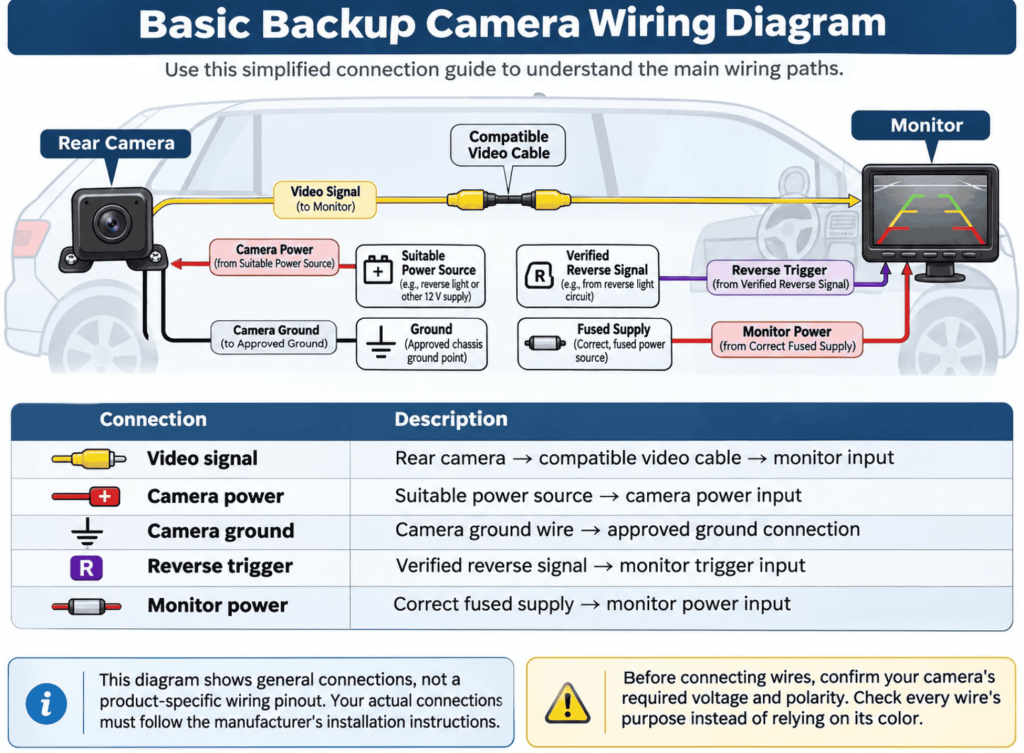
Use this simplified connection guide to understand the main wiring paths.
| Connection | Wiring path |
| Video signal | Rear camera → compatible video cable → monitor input |
| Camera power | Suitable power source → camera power input |
| Camera ground | Camera ground wire → approved ground connection |
| Reverse trigger | Verified reverse signal → monitor trigger input |
| Monitor power | Correct fused supply → monitor power input |
This diagram shows general connections, not a product-specific wiring pinout. Your actual connections must follow the manufacturer’s installation instructions.
Before connecting wires, confirm your camera’s required voltage and polarity. Check every wire’s purpose instead of relying on its color.
For more installation details, read the TadiBrothers Backup Camera Wiring Guide.
4. Protect Your Wiring Harness From Heat and Moisture
Even a compatible wiring harness can fail from poor cable routing. Heat, water, sharp edges, and vibration can damage exposed connections.
For example, a cable near your exhaust may suffer heat damage. A tightly stretched tailgate wire may also break over time.
Follow these precautions when installing your backup camera wiring:
- Keep cables away from hot exhaust and engine components.
- Use rubber grommets when passing wires through metal panels.
- Secure loose cables with suitable automotive cable ties.
- Protect exposed sections with automotive wiring loom.
- Keep connectors sealed and away from standing water.
- Allow enough slack around moving tailgates and trunk lids.
Avoid routing cables near pedals or airbag deployment areas. Your camera wiring should never interfere with important vehicle controls.
For RVs and trailers, inspect connections exposed to road spray. Choose properly rated connectors for outdoor installation and vehicle movement.
5. Test Your Backup Camera Harness Before Final Installation
Always test your camera before replacing the vehicle’s interior panels. You can catch wiring problems before completing the installation.
Start by connecting your camera, monitor, and power supply correctly. Keep your vehicle parked safely while performing these checks.
Use this simple testing checklist:
- Confirm your camera receives the correct voltage and power.
- Check that your monitor turns on without interruptions.
- Shift into reverse and confirm the camera image appears.
- Test continuous viewing if your system supports that feature.
- Inspect the screen for flickering or missing video.
- Check every connector for loose or damaged contacts.
If your camera fails, check the power and ground first. Then inspect your video connection and reverse trigger signal.
You should also confirm that your camera and monitor are compatible.
Once everything works, secure the harness and reinstall your panels.
Common Backup Camera Wiring Harness Problems
Your screen’s behavior can help you identify common wiring faults. Use this troubleshooting table before replacing your camera or monitor.
| Problem | Possible cause | What you should check |
| Black screen | Missing power or video signal | Verify power, ground, and video connections |
| Flickering image | Loose connection or unstable power | Inspect connectors and supply voltage |
| Camera works only in reverse | Reverse-only power connection | Check the intended camera power setup |
| No image after replacement | Incompatible camera or harness | Verify pinout, video format, and voltage |
| Intermittent video | Damaged cable or connector | Inspect exposed wires and cable routing |
If these checks fail, use your system’s troubleshooting guide. Complex wiring faults may require help from a qualified installer.
Which TadiBrothers Backup Camera Harness Fits Your Vehicle?
Your ideal wiring setup depends on your vehicle and camera type. Choosing compatible components together can prevent avoidable installation problems.
For Cars and Small Trucks
Consider the TadiBrothers License Plate Backup Camera with 7-Inch Monitor.
This wired system includes a 15-foot cable and compatible components. You can configure supported reverse-only or continuous viewing operation.
For Large Trucks and RVs
Consider the TadiBrothers Heavy Duty 1080P Wired AHD Camera System.
This system includes an AHD monitor and a 50-foot cable. Its locking cable design suits compatible heavy-duty camera installations.
For Fifth Wheels and Trailers
A TadiBrothers Quick-Disconnect Backup Camera System may suit your towing setup.
Its detachable connection makes hitching and unhitching easier to manage.
You can also explore TadiBrothers Backup Camera Accessories for cables, adapters, and compatible parts.
Final Thoughts
You’ll need a backup camera system that has a wiring harness matching your camera and monitor. Always check with your operator and ask what kind of connector is being used, warranty on the product, cable length, and power requirements before installation.
You should also protect your wiring and test every connection. These steps help reduce fitment issues and unexpected camera failures.
If you’re looking for the most trusted backup camera system then explore TadiBrothers Backup Camera Systems. And find suitable cameras, cables, and installation accessories.
Frequently Asked Questions
Are Backup Camera Wiring Harnesses Universal?
No, cameras use different connectors, voltages, pinouts, and video formats. You must check compatibility before replacing your existing wiring harness.
Can You Reuse an Existing Backup Camera Wiring Harness?
Yes, you can sometimes reuse an existing harness with compatible equipment. Check the connector pinout, voltage, cable condition, and video format first.
Can You Convert a 4-Pin Backup Camera Connector to RCA?
Yes, compatible adapters can connect certain 4-pin systems to RCA equipment. However, you must still verify power requirements and video signal compatibility.
Why Does Your Backup Camera Show No Signal?
Your camera may have a loose cable or missing power. Check its ground, video connection, reverse trigger, and monitor compatibility.