
A magnetic wireless backup camera simplifies installation by combining temporary mounting with wireless video. Instead of routing a long cable through your vehicle or trailer, you mount the camera where you need it and send the video to a compatible monitor or device.
That is genuinely useful for trailers, trucks, boats, and any place where permanent wiring just doesn’t make sense. But wireless doesn’t mean maintenance-free. You still need to think through power, mounting strength, signal range, and weather exposure before buying one.
Why Wiring Trips Up So Many DIY Installs
Running a camera cable from trailer to tow vehicle takes real time. Tight spaces, sealed panels, moving parts, and long routing paths turn a “quick install” into something much longer than expected.
Power adds another layer. You need a suitable connection, and cables that aren’t routed carefully end up pinched, damaged, or exposed to water and road debris. A wireless camera cuts down on some of that work, but it still needs power somehow, and some setups still require a wired connection for the monitor or charger.
What Actually Goes Wrong With Wired Installs
A properly installed wired system works fine. But installation quality matters a lot here, and a few things go wrong more often than you would think.
- Poor power connections causing intermittent operation
- Pinched or chafed cables from routing mistakes
- Unsealed mounting holes letting water in
- Corroded connectors after months of moisture exposure
- Cables routed too close to moving or hot components
Wireless setups skip the long cable entirely, but they bring their own tradeoffs, mainly battery management and signal performance.
What to Check Before You Buy
Look past the word “wireless” before you commit to a camera.
- Battery and power. Check how it is powered and how long the battery is expected to last under normal use.
- Charging. USB, dedicated charger, or solar assist, figure out which fits how you’ll actually use it.
- Pairing. If you’re moving the camera between vehicles, check how easily it reconnects each time.
- Wireless range. Treat the manufacturer’s number as a reference point, not a guarantee. Distance, obstacles, and antenna placement all affect real performance.
- Magnetic mounting. Confirm the surface actually holds a magnet securely, and that it’ll stay put through vibration and travel.
- Weather resistance. Rain, dust, and road spray hit these cameras directly, so check the actual rating.
5 Magnetic Wireless Backup Camera Setups Worth Considering
1. Single Magnetic Hitch Camera. A compact camera near the hitch point makes trailer alignment easier when you are working alone. The surface has to support magnetic mounting, and the camera needs a secure position so vibration doesn’t throw off the angle. TadiBrothers offers backup camera systems in both wired and wireless configurations, so check the specs for your particular vehicle or trailer setup.
2. App-Based Magnetic Camera. Some cameras send video straight to your phone instead of a dedicated monitor. Less equipment to manage, though connectivity varies. Check whether it runs on a direct WiFi connection or needs something else, and confirm your phone actually works with it before buying.
3. Solar-Assisted Magnetic Camera. Can cut down how often you recharge manually, under the right conditions. Solar performance depends on sunlight, panel placement, weather, and how much you are actually using the camera. Think of it as a charging feature, not a promise the battery stays full forever.
4. Multi-Vehicle Magnetic Setup. Handy if you want one camera working across a few compatible vehicles or trailers. Check the mounting surface, camera angle, power, and monitor compatibility each time you move it. If switching often is the whole reason you want a magnetic camera, an easy pairing process matters more than almost anything else.
5. Magnetic Camera With Proximity Sensors. A camera shows you what is there. Sensors tell you how close it is. Different jobs entirely. If you go with a combined system, make sure the camera, sensors, monitor, and power components are actually built to work together.
Step-by-Step: Installing a Magnetic Camera
A typical install looks something like this.
- Clean the mounting surface, dirt and grease weaken the hold.
- Confirm the surface can actually support the camera securely.
- Attach the camera somewhere with a clear view of the area you care about.
- Power it up per the manufacturer’s instructions.
- Pair it with your monitor or app.
- Adjust the angle and check the image.
- Test it at the distance and location you’ll actually be using it.
The exact steps shift by product, so follow the manufacturer’s instructions closely, especially around power, charging, and weather exposure.
How Much Time Does This Actually Save?
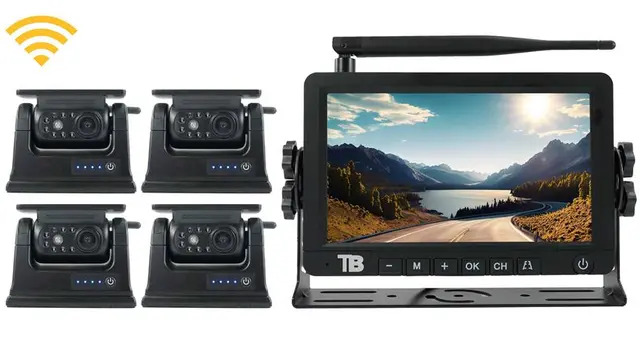
A magnetic wireless camera cuts down installation work mostly by skipping the long cable run. But how much time it saves varies a lot. A simple removable camera might take just a few minutes to mount and pair. A more complex multi-camera setup takes longer.
Permanent wired systems generally need more work overall, since cables have to be routed and secured properly. The real time cost depends on your vehicle, trailer, mounting spot, and power source, there is no single number that fits every setup.
Wireless vs. Hardwired: Which Fits Your Setup?
Each comes with its own tradeoffs.
Wireless systems install easier and offer more flexibility, but you are managing battery life and dealing with signal range and interference. Hardwired systems take more work upfront, but once installed, you get a permanent power and video connection with no battery to think about.
Worth asking yourself:
- Will this camera stay on one vehicle?
- Do I actually need it removable?
- How often will I really use it?
- Is charging a battery something I’ll keep up with?
- Does my mounting surface even support a magnet?
- Will this camera face heavy rain, dust, or road spray regularly?
Your answers should tell you pretty clearly whether the wireless convenience is worth the tradeoffs.
Finding the Right Fit for Your Setup
A magnetic wireless camera makes sense for temporary installs, equipment that moves around a lot, or anywhere permanent wiring is just impractical.
TadiBrothers carries backup camera systems in a range of configurations, so compare mounting method, power source, wireless range, weather resistance, and monitor compatibility before choosing. And remember, a magnetic mount is convenient, but it is not a substitute for a genuinely secure installation. Make sure the camera stays put through normal driving, not just while it’s parked.
Frequently Asked Questions
Does a magnetic wireless backup camera require any wiring?
It may skip the video cable and vehicle wiring, but it still needs power from somewhere. Some monitors need their own power or charging too.
How often does the camera need charging?
Depends on the battery, how much you use it, temperature, and the specific model. Check the manufacturer’s stated specs rather than assuming.
Can I move the camera between vehicles?
Usually, yes, if the mounting surfaces and camera are compatible. You’ll likely need to re-pair it with the right monitor or app after each move.
Is wireless as reliable as a wired connection?
It works well within its intended range, but obstacles, distance, and interference all affect performance. A wired connection sidesteps those specific issues entirely.
Will a magnetic mount work on any vehicle?
No. It needs a real ferromagnetic surface with enough contact area to hold securely. Always check your specific vehicle or trailer before assuming it’ll work.
Choosing a Magnetic Backup Camera
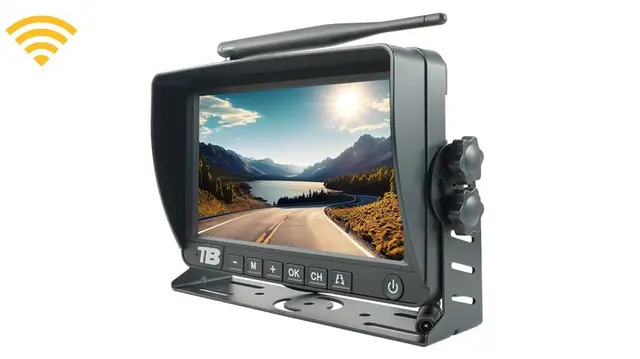
A magnetic wireless backup camera can be genuinely practical when you want easier installation or something removable. Just don’t stop at the word “wireless.” Check the mounting surface, battery, charging method, range, weather resistance, and monitor compatibility first.
For occasional hauling or temporary setups, that flexibility is worth a lot. For daily commercial use, a hardwired system often still makes more sense, depending on exactly how you are running the equipment.