
A backup camera not working can disrupt your driving confidence and compromise safety. We provide a complete, detailed guide to help you diagnose and correct the most common display problems quickly and accurately.
Our goal is to help you restore a clear, stable, and reliable backup camera view without confusion or wasted time. You can also check out the latest backup camera systems and explore replacement options if your current unit needs an upgrade.
Whether you use a wired or wireless camera setup, this guide walks you through expert-level steps to get your backup camera screen working flawlessly again.
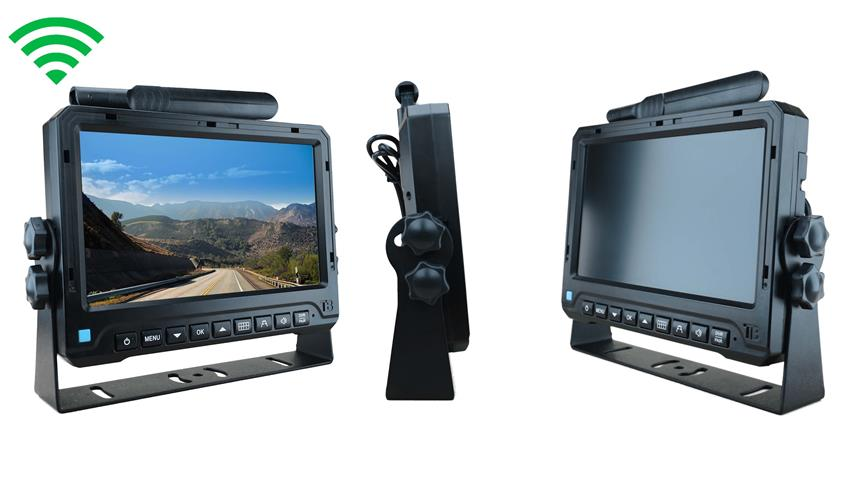
Alt text: Wireless vehicle backup camera monitor system with a wide display screen, adjustable mounting bracket, side control knobs, and top antenna shown from front, side, and rear angles
Understanding the Most Common Backup Camera Display Failures
Vehicle owners experience several recurring issues with their camera systems. These include blank screens, distorted images, flickering displays, or delayed signals.
When a backup camera not working becomes a recurring problem, it typically stems from wiring faults, poor power flow, signal interference, or internal hardware failure.
By isolating and testing each point of failure, we restore consistent performance and ensure the display activates instantly when the vehicle shifts into reverse.
READ: Why Your Backup Camera Isn’t Working and the Quick Fixes You Need
Blank or Black Screen When Shifting Into Reverse
Often, a disrupted power connection or faulty ground causes a black backup camera screen. We inspect each part of the circuit to ensure proper voltage reaches the camera and monitor.
Check Power and grounds.
Begin by confirming that the reverse light power feed is delivering stable voltage. Corrosion, loose crimps, or broken wires interrupt the signal and cause the backup camera not to work. A repaired ground point and secure connection immediately restore reliable power.
Inspect the Monitor Input Source
Some screens switch input modes automatically. We verify the monitor is configured to display the correct video feed and that the input cable is fully seated.
Flickering, Static, or Rolling Lines on the display.
Image flicker or static occurs when the video signal becomes unstable. This may be caused by frayed RCA connectors, poor shielding, or electromagnetic interference.
Evaluate Video Cable Integrity
We check all video cables for bends, crushed insulation, or exposed wire. Damaged cables cause analog noise and unstable images. Proper replacement eliminates distortion and brings back a clean, sharp view.
Reduce Interference Near Power Lines
Running video cables next to high-current wires invites interference. We route cables correctly and use shielded lines to protect the signal from alternator noise or onboard electronics.
Delayed Image Response or Slow Activation
If the camera view takes too long to appear, the monitor may not be receiving stable voltage fast enough. This often happens with older wiring or weak reverse-light circuits.
Boost Power Source stability.
By testing the voltage drop in the reverse circuit, we can determine whether the camera is receiving adequate power. Running the camera through a relay or dedicated power feed speeds activation and enhances display reliability.
Distorted, Blurry, or Out-of-Focus View
A hazy or warped image reduces visibility and increases risk. Lens care and camera alignment are essential for accurate clarity.
Clean the lenses thoroughly.
Dust, dirt, and water spots accumulate over time. We use proper microfiber cloths and nonabrasive cleaners to restore full clarity.
Adjust Camera Angle
Incorrect mounting produces unnatural viewing angles or warped guidelines. Fine-tuning the camera bracket ensures the image sits level, centered, and properly aligned with the road.
Issues such as colored lines, a green screen, or image tearing indicate a connection problem with the video feed.
A green or multi-colored screen signals a connection problem with the video feed.
Verify RCA or Plug-And-Play Connections
A partially inserted connector is enough to trigger image tearing. We confirm every plug is locked firmly in place and replace loose connectors immediately.
Test Monitor Compatibility
Older monitors sometimes struggle to decode signals from new HD cameras. We confirm format compatibility and update the display if needed for perfect synchronization.
Intermittent Signal Loss in Wireless Backup Camera Systems
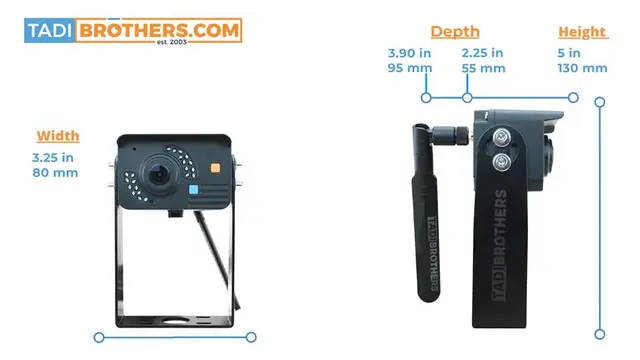
Alt text:Dual-angle view of 1080P wireless backup camera offering 300ft+ signal range.
Wireless systems sometimes drop signals due to distance, interference, or outdated transmitters.
Check Antenna Position
We adjust transmitter and receiver placement to increase line-of-sight and avoid physical obstructions. Metal surfaces can block signals, so correct mounting improves strength and stability.
Update to Modern Digital Wireless Systems
Analog wireless systems experience more dropouts. A modern digital unit eliminates interference and provides consistent image quality during every reverse maneuver.
Backup Camera Shows Blue Screen Instead of Video Feed
A blue screen means the monitor is powered but not receiving any video signal from the camera.
Trace Video Path
We examine each point between the camera and monitor to ensure proper connection. One loose RCA plug or damaged cable section is enough to break the signal.
Test Camera Output
We test the camera with an alternate monitor to confirm whether the camera itself is functional. If it fails, replacement is required.
Night Vision Not Working or Poor Low-Light Image
Cameras rely on infrared LEDs for nighttime visibility. When night vision performance drops, it often signals LED malfunction or weak power flow.
Test Infrared LEDs
If the LEDs fail to illuminate, the camera cannot provide a clear view in darkness. We replace the LED module or camera as needed.
Improve Power Delivery
Poor wiring reduces low-light performance. A stable, clean power feed enhances brightness and improves detail during nighttime driving.
Backup camera guidelines are not appearing.
You can use the backup camera systems guidelines to judge distance, and their absence makes reversing more difficult.
Enable Settings in the monitor.
Many displays include settings that toggle guidelines on or off. We access the setup menu and activate the feature when available.
Verify Camera Capability
Some manufacturers allow guidelines to be disabled with a simple wire loop. We reconnect the loop or adjust wiring to restore the guidelines.
Frozen Image or Camera Reboots Repeatedly
When the system freezes or restarts, unstable power or overheating components are usually responsible.
Examine Power Stability
We test for voltage fluctuations while the vehicle is in reverse. Stable voltage prevents system resets and ensures a continuous, uninterrupted view.
Improve Ventilation
Overheating compact housing leads to freezing. We reposition the camera or monitor to allow airflow and prevent thermal shutdowns.
When to Replace a Backup Camera System
If repeated troubleshooting still leaves the backup camera not working, it may be time to upgrade. Cameras with failing processors, weak LEDs, or outdated resolution cannot deliver modern clarity.
Modern systems offer sharper images, stronger night vision, wider angles, and better display accuracy. When replacement becomes necessary, choosing a reliable, well-tested brand ensures long-term performance and peace of mind.
Professional Troubleshooting and Reliable Backup Camera Support
For persistent issues, we recommend consulting trained technicians who specialize in camera diagnostics.
Professionals like TadiBrothers can identify wiring faults, test circuits, and calibrate your backup camera screen with precision instruments. Proper installation and expert adjustments ensure you regain a flawless, consistent view.
Final Thoughts
A backup camera not working undermines safety, but most issues are easy to diagnose and correct with structured troubleshooting.
By checking power flow, cable integrity, signal pathways, and system compatibility, you restore a clean and dependable rearview that activates instantly and performs reliably every day.