
A tractor backup camera gives you a clearer view of what is hidden behind the tractor or whatever is attached to it. That extra visibility helps when backing toward a gate, implement, trailer, or anything else you would rather not hit.
Tractors have limited rear visibility for a reason. The cab, ROPS structure, loader equipment, and mounted implements all get in the way. A properly positioned camera adds another angle, one that doesn’t rely purely on mirrors and constant shoulder checks.
Why Tractors Have Limited Rear Visibility
Cab structures, ROPS bars, loaders, and mounted implements block parts of the rear view. Attach a baler, mower, trailer, or grain cart, and even more of that area disappears.
Open-station tractors face a different problem. Fewer physical obstructions, sure, but the camera and monitor sit far more exposed to direct sun, dust, and weather.
A backup camera won’t replace checking your surroundings. It just adds one more angle that makes maneuvering easier.
What Matters on an Open-Station Tractor?
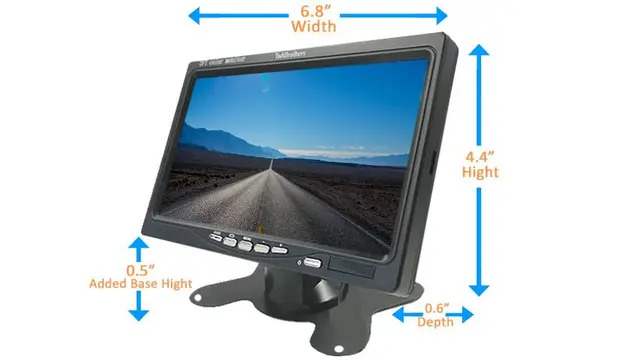
Monitor visibility becomes critical once you are working in direct sunlight. A screen that reads fine in the shade can turn nearly unreadable the second sunlight hits it head-on.
Look for a monitor built for outdoor or daylight use, and check the mounting options before you buy. Positioning matters too, the screen needs to stay visible without blocking your controls or normal line of sight.
For the camera itself, weather resistance, mounting stability, viewing angle, and cable protection all matter. Open equipment takes a beating from dust, mud, rain, and shifting temperatures that a cab never sees.
6 Tractor Backup Camera Setups Worth Considering
Different jobs call for different setups.
1. Single Wired Rear Camera. Straightforward rear visibility, no wireless connection to worry about. Works well when the camera stays permanently installed on one tractor. The tradeoff is installation, since video and power cables both need routing between camera, monitor, and power source. TadiBrothers offers wired and wireless configurations for different equipment, so check the specific camera, monitor, and power requirements first.
2. Wireless Single-Camera Setup. This setup simplifies things when running a long cable just isn’t practical. Also handy if you are moving the camera between machines. Range varies by system though, and metal structures between camera and monitor can weaken the signal. Check the manufacturer’s stated range rather than assuming every wireless system behaves the same.
3. Multi-Camera System for Loaders and Hitches. One rear camera doesn’t always cut it. A multi-camera setup adds views around the areas hardest to see from the seat, rear, front, hitch, or sides, depending on the system. Useful for connecting implements or maneuvering a loader. Just confirm the monitor actually supports the number of cameras you’re planning to run.
4. Weather-Resistant Camera System. Farm equipment sees dust, mud, rain, and swinging temperatures on a regular basis. A weather-resistant camera handles that better than one built for indoor use. Check the stated weather rating, operating temperature range, and housing design, and make sure cables and connectors are protected too.
5. High-Brightness Monitor System. Worth considering if the tractor spends most of the day outdoors. The goal is a display readable in shifting light without forcing you to shift your seat every time the sun moves. Don’t judge a monitor by brightness numbers alone though, look at it in real conditions if you can, and weigh screen size and mounting position too.
6. Multi-Angle Camera Setup for Harvest Equipment. Harvest work often needs more than just rear visibility. Extra cameras can cover hitches, loading areas, or other working zones, depending on what you are running. Figure out which spots are actually hard to see from the seat first, then pick camera positions that address those specific gaps.
Moving a Camera Between Multiple Tractors
Running several tractors changes the equation. A wireless system can simplify moving a camera between machines, but it’s not quite as simple as pairing a phone to a speaker. Camera and monitor compatibility, power connections, and mounting hardware all vary by system.
If you zre swapping equipment often, worth thinking through:
- Whether the camera needs permanent wiring
- How the camera actually gets power
- Whether the monitor supports multiple cameras
- Whether each tractor needs its own mounting hardware
- Whether the system’s wireless range covers your setup
Keeping compatible components together makes life easier when you’re switching things around often.
Common Wireless Camera Problems
Signal dropping out? Start with the basics.
Distance is the usual first culprit, make sure the camera and receiver sit within the system’s specified range. Metal structures and equipment between the two can weaken transmission as well. A weak or unstable power source causes its own intermittent issues, and loose power or video connections can mimic wireless interference even when the wireless part is fine.
If the problem sticks around after checking all that, the manufacturer’s troubleshooting guide for your specific system is the next step.
Is a Tractor Backup Camera Worth It?
Depends on your equipment, your working environment, and how much visibility you actually need. A basic rear camera covers most reversing needs. A multi-camera setup makes more sense if loaders, hitches, trailers, or large implements are part of your regular routine.
Before buying, think through:
- Cab or open-station tractor?
- Will the camera live on one tractor permanently?
- Rear visibility only, or more?
- Would front, hitch, or side views actually help?
- How much dust and weather exposure are we talking about?
- Where does the monitor realistically need to mount?
These questions narrow things down fast, without getting hung up on specs that don’t actually matter for your setup.
Finding the Right Fit for Your Farm
A compact tractor used occasionally has different needs than equipment running nonstop through harvest. Tractor size, attached implements, mounting location, power source, and monitor position all factor in. For wireless systems, check the transmission range and installation requirements too.
TadiBrothers carries backup camera systems across different configurations, including options built for specific vehicle and equipment types. Reviewing the individual specs against your actual tractor beats guessing.
Frequently Asked Questions
Will a backup camera work on an open-station tractor?
Yes. Pick a camera and monitor built for outdoor conditions. Monitor visibility in direct sunlight matters most here.
Can I move one camera system between multiple tractors?
Often, yes, depending on the system. Check compatibility, mounting, power connections, and wireless specs before moving equipment around.
Why does my wireless camera keep losing signal?
Distance, obstructions, power issues, and installation problems can all play a role. Rule these out before assuming the camera’s dead.
How long does a tractor backup camera last?
No universal answer here. Durability depends on the camera itself, weather exposure, installation, and how well it is maintained. Check the specific model’s warranty and specs.
Do I need more than one camera?
Not always. A single rear camera often covers basic visibility fine. Extra cameras help once loaders, hitches, or other equipment start creating blind spots of their own.
Choosing Your Tractor Backup Camera
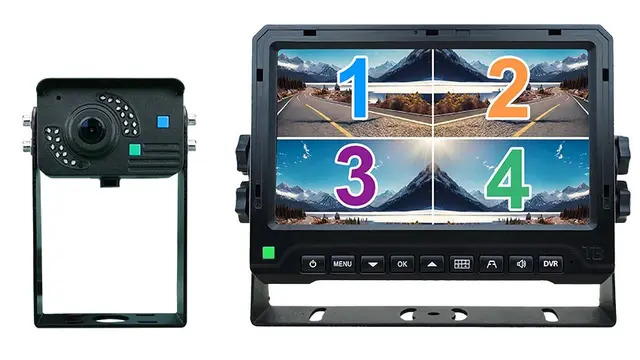
The right setup matches how you actually use your equipment. Basic rear visibility usually needs just one camera. Regular work with large implements, or tighter visibility needs around a hitch or loader, often calls for a multi-camera setup instead.
Focus on camera placement, viewing angle, weather resistance, monitor visibility, and compatibility, not any single spec in isolation. Get that right, and you have got one more useful view whenever you are maneuvering equipment, connecting an implement, or backing into a busy work area.