
A backup camera not turning on when in reverse almost always comes down to one of five things. A blown fuse. A loose wire. A software hiccup. A wrong setting. Or damaged hardware. Most of these you can check yourself in fifteen minutes, no mechanic required.
You shift into reverse, glance at the screen, and nothing shows up. Just your radio display, or worse, a black screen staring back at you. The team at TadiBrothers fields this question constantly, and it’s rarely as complicated as people assume. After helping thousands of drivers troubleshoot backup cameras, we have seen the same problems come up again and again.
Here is the short version of what is going on. On many aftermarket systems, shifting into reverse sends a trigger signal that activates the camera and tells the monitor to switch views. Break that chain anywhere along the way, and the camera won’t turn on. It’s rarely a total system failure. Usually it’s just one weak link. Let’s go fix by fix.
1: Check the Fuse First
A blown fuse is one of the first things worth checking. Pop open your fuse box, usually tucked under the dash or in the engine bay. There’s a legend printed right on the cover. Look for the fuse labeled “Back Up,” “Camera,” “Reverse,” or “Infotainment.” Depending on your vehicle, pull it, and hold it up to the light.
- Don’t swap in a higher amperage fuse than what’s called for
- Toss a couple of spares in your glovebox while you’re at it
- If the replacement blows again right away, something else is shorting the circuit
2: Inspect the Wiring
Give the connector near the license plate or tailgate a gentle wiggle. Corrosion sneaks in over time, especially if you drive through rain a lot. There’s also a trigger wire in the mix, the one that tells your screen to flip over to camera view the moment you shift into reverse. Loose trigger wire, and your camera might be getting power just fine while the screen never gets the memo.
3: Reset the System
Sometimes it’s not the hardware at all. It’s software confusion, plain and simple. A reset clears most of that out:
- Turn off the engine and pull the key
- Disconnect the negative battery terminal for ten minutes. Be aware this may reset some vehicle settings.
- Reconnect it and start the vehicle back up
- Shift into reverse and check the screen
Some factory infotainment systems also have their own restart procedure. Check your owner’s manual if a standard reset doesn’t solve the problem.
4: Check Your Display Settings
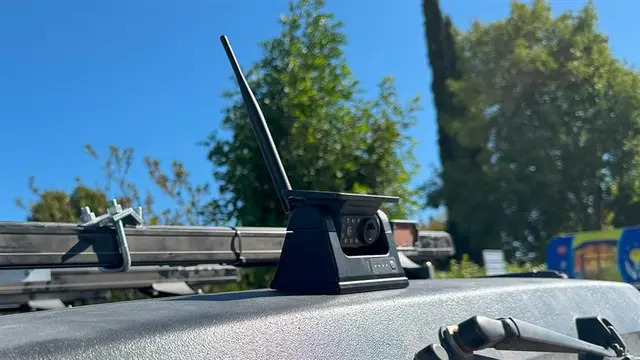
Sometimes the camera’s working just fine. The screen just isn’t set to show it. Poke around in the settings menu for camera input or auxiliary video, and make sure it’s toggled on. This is often where a backup camera not working black screen situation gets solved without ever touching a wire. A black screen doesn’t automatically mean something’s broken. In many cases, the display is simply set to the wrong input.
5: Rule Out Damaged Hardware
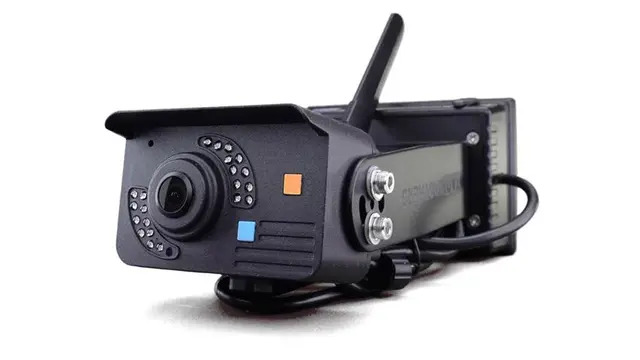
Checked the fuse, the wiring, done a reset, confirmed the settings, and still nothing? At that point the camera or display itself is probably the actual problem. Moisture in the housing, a cracked lens, a dead sensor, any of these can block the signal entirely. Honestly, at that stage it’s usually less hassle to swap in a fresh unit from Backup Camera Systems than to keep chasing a part that’s already on its way out.
Quick Troubleshooting Table
| Symptom | Likely Cause | Fix |
| No image at all | Blown fuse | Replace the fuse |
| Black screen | Power or wiring loss | Check trigger wire, test voltage |
| Delayed image | Software glitch | Reset the system |
| Works, wrong screen | Display setting | Switch input manually |
| Foggy or blurry | Moisture or lens damage | Dry housing, clean or replace lens |
Repair or Replace?
A few questions worth sitting with:
- Is this camera pushing five years old or more?
- Has it given you trouble before this?
- Would going wireless finally solve these wiring headaches?
Answered yes to any of those? Take a look through Backup Camera Systems before sinking more time into repairs. Wireless setups mean fewer wires around to corrode in the first place, and weatherproof housings hold up a lot better against rain and mud than older wired units ever did.
At TadiBrothers, we’ve spent years walking drivers through exactly this, people who just want to back up safely without a fight. Three fixes deep and still staring at a blank screen? That’s usually a sign worth listening to.
A backup camera not turning on when in reverse is frustrating, sure, but it’s rarely a mystery once you know where to look. Fuse first. Wiring next. Then a reset. Then settings. Damaged hardware only after everything else comes up empty.
So, which of these five are you trying first tonight?
FAQs
1. Why does my backup camera show a black screen instead of turning on?
A backup camera not turning on when in reverse and a plain black screen usually share the same root cause, a blown fuse, a loose connector, or a wiring problem cutting power before it ever reaches the screen.
2. Can a software glitch really stop the camera from turning on?
It can, yes. A battery reset can resolve some software glitches, though it won’t fix wiring or hardware problems.
3. Is it worth repairing an older backup camera, or should I replace it?
Past five years old, or if it keeps failing, a newer system from TadiBrothers usually saves more hassle than another round of repairs.