
A 360 crane camera system helps operators see more around their mobile cranes and reduce blind spots. It combines several camera views into one display, making nearby obstacles easier to spot.
Think about moving a mobile crane through a busy construction site. Workers, trucks, and building materials may surround your machine. Even an experienced operator cannot see every area from the cab.
A surround-view system provides another way to check those spaces. But how much does it help with daily crane operations?
Here are five practical benefits, along with the features and limitations you should know.
Why Do Mobile Cranes Need a 360-Degree Camera System?
Mobile cranes are large machines with several areas that operators cannot see directly. The cab, equipment body, and nearby structures can block important views.
Imagine moving through a narrow construction yard. A worker may walk near the rear while materials sit beside your crane. Mirrors help, but some areas may remain difficult to check.
A 360-degree camera uses multiple cameras to show the machine’s surroundings. Many systems combine these images into a bird’s-eye view.
This provides useful visual support during movement and positioning. However, cameras cannot replace trained signal persons or required safety procedures.
The five main benefits include:
- Better visibility: See more areas around the crane.
- Easier movement: Check obstacles during slow travel and reversing.
- Greater awareness: Monitor nearby workers and equipment.
- Better positioning: Check surrounding space before moving.
- Useful recordings: Review saved footage when supported.
These benefits depend on proper camera placement and system setup. Let’s explore how each one helps during real work.
1. Reduce Blind Spots Around Your Mobile Crane
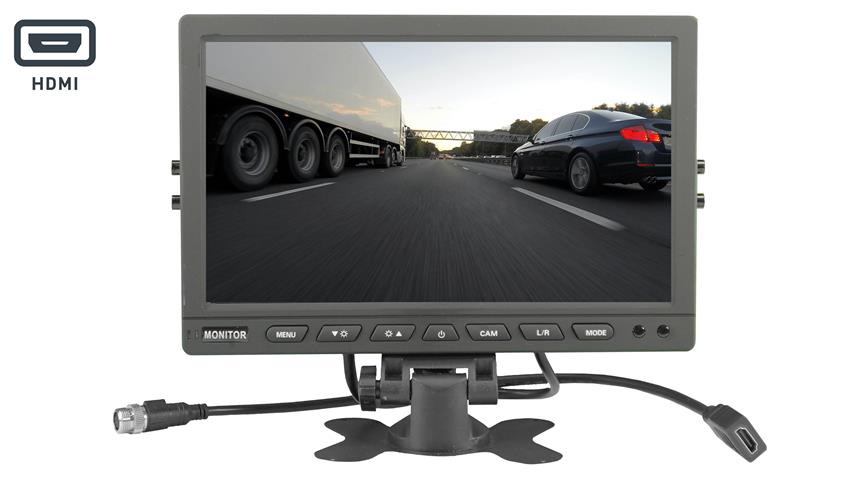
Blind spots are a major concern when operating large equipment. You may see the area ahead but miss objects beside the crane. The rear can also be difficult to check from the cab.
Picture moving your crane near stacked building supplies. A small barrier may sit below your normal view. A side camera could help you notice that obstacle sooner.
A crane camera system combines views from several positions. This gives operators a broader picture than one rear camera alone.
How Does a 360-Degree Camera Improve Visibility?
Most surround-view systems use cameras mounted around the equipment. Software combines their images into a single display.
This can create a view that looks down from above. Some systems also provide simulated 3D side views.
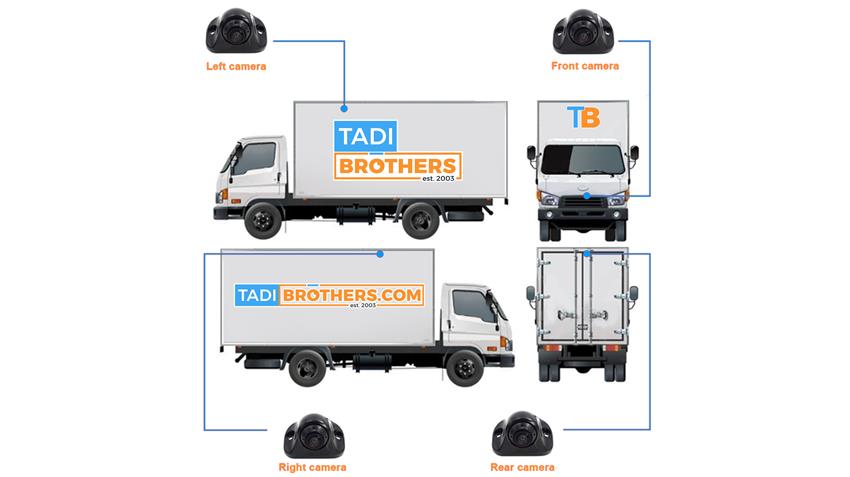
For example, the TadiBrothers 360° Mobile Crane Surround View Camera System includes four 1080p wide-angle cameras. These cameras work with a seven-inch monitor and integrated DVR.
The system combines camera footage to show surrounding areas. This helps operators check several directions from one screen.
Still, no camera can show every possible hazard. Camera mounts, nearby objects, and image stitching may create viewing gaps.
You should always check your surroundings before moving.
2. Make Reversing and Slow Crane Movement Easier
Moving a mobile crane through a crowded site takes care. You may need to pass parked trucks or stored materials. Limited rear visibility can make each move harder.
A rear camera helps show objects behind your machine. Side cameras provide additional views during slow turns. Together, they can support better decisions while moving.
Why Does a Surround View Help During Reversing?
Imagine reversing toward a narrow equipment parking area. Your mirrors show nearby machines, but one corner remains hard to judge.
A surround-view display may help reveal nearby obstacles. You can use that information while following normal movement procedures.
This is especially useful when space is limited.
A 360-degree camera may help operators:
- Check nearby objects before reversing.
- Watch side clearance during slow turns.
- See selected areas around the machine.
- Notice obstacles that mirrors may miss.
- Check camera views before changing position.
However, the display does not measure every clearance. Objects may appear distorted or farther away than expected.
Use cameras alongside direct observation and approved signaling procedures.
3. Improve Awareness of Workers and Equipment
Construction sites rarely stay the same throughout the day. Workers move between tasks while trucks deliver supplies. Materials may also appear in previously clear areas.
That constant movement makes awareness especially important. Even a small change can affect the crane’s travel path.
A surround-view camera helps operators monitor nearby activity. It can show people or equipment within the cameras’ visible areas.
Can a Crane Camera Replace a Signal Person?
No, a camera should not replace required signaling procedures. It provides additional visual information, not complete control over site hazards.
For example, a worker may stand outside the camera’s view. Another machine could block part of the image.
According to OSHA’s crane signaling requirements, signal persons are required in certain situations. These include obstructed travel views and load placement areas outside the operator’s full view.
A camera does not automatically remove those requirements.
Use the following practices alongside camera monitoring:
- Check surroundings: Inspect the travel area before moving.
- Follow signals: Maintain clear communication with required signal persons.
- Keep workers clear: Follow established equipment exclusion zones.
- Watch the display: Use cameras as added visual support.
A 360 crane camera system works best as part of a wider safety plan. It helps you gather information without replacing trained judgment.
4. Support Better Crane Positioning in Tight Spaces
Choosing the right crane position is not always simple. You must consider the ground, nearby structures, and planned work area.
A surround-view camera can help you check nearby objects. This may be useful when approaching a designated setup location.
Imagine positioning a mobile crane beside a large building. Your machine may need to pass close to parked equipment. Side views can help you monitor that nearby space.
How Does a 360-Degree View Help With Positioning?
A bird’s-eye display brings several views together. This can make the surrounding layout easier to understand.
You may see where barriers sit beside the machine. You can also check nearby equipment before making small movements.
However, cameras cannot confirm whether the ground can support your crane. They also cannot assess outrigger loads or overhead clearance.
Those decisions require proper planning and qualified personnel.
Before positioning a mobile crane, consider:
- Ground conditions: Confirm the area meets crane setup requirements.
- Nearby obstacles: Check walls, parked vehicles, and site materials.
- Travel clearance: Follow the approved route and movement plan.
- Outrigger space: Verify clearance using the crane’s setup requirements.
- Overhead hazards: Check structures and power lines independently.
The camera supports your view of the surroundings. It does not replace the measurements and checks needed for safe setup.
5. Review Recorded Footage for Better Site Awareness
A live camera view helps during daily operations. But recorded footage can also provide useful information afterward.
Imagine a crane passing close to a parked vehicle. Someone later notices damage near the parking area. Recorded video may help clarify what the cameras captured.
Some surround-view systems include digital video recording. This allows you to review footage from earlier operations.
What Is the Benefit of an Integrated DVR?
A DVR stores camera footage for later viewing. Depending on the system, recordings may support incident reviews or operator training.
The TadiBrothers 360° Mobile Crane Camera System with Integrated DVR includes recording capabilities. TadiBrothers states that its DVR stores footage on a secured memory card. The product also supports playback.
That can be useful for reviewing selected site events.
Recorded video may help with:
- Incident reviews: Check what appeared in the recorded view.
- Training: Discuss operating situations using real footage.
- Site reviews: Identify recurring visibility concerns.
- Equipment checks: Examine camera footage after reported issues.
Keep in mind that footage only shows what the cameras captured. Recording quality also depends on proper setup and working equipment.
A DVR does not guarantee that every incident will be recorded.
What Should You Check Before Buying a Crane Camera System?
Not every surround-view setup suits every crane. Different machines have different dimensions, cab layouts, and electrical systems.
A compact mobile crane may need different mounting positions than a larger model. You should confirm compatibility before purchasing any camera kit.
Think about where your crane works most often. Does it travel through tight yards or large open sites? Does it need clear views near parked equipment?
Those answers help you focus on useful features.
Check the Camera, Monitor, and Installation Requirements
Image quality matters because small objects can be difficult to recognize. A clear screen also helps when viewing several camera feeds.
But camera placement is just as important as resolution. A poorly mounted camera can leave important areas outside its view.
Before buying, review these points:
- Camera quality: Check resolution and low-light performance.
- Monitor size: Make sure the screen fits your cab.
- Camera placement: Identify suitable front, rear, and side mounting points.
- Durability: Review dust, water, and vibration specifications.
- Power requirements: Confirm compatibility with your crane’s electrical system.
- Recording: Check DVR storage and playback features.
- Installation: Review wiring, calibration, and mounting needs.
A qualified installer can help confirm the setup. This is especially useful when camera placement requires custom mounting.
Why you should check out TadiBrothers 360-Degree Mobile Crane Camera.
If you want a dedicated surround-view setup, TadiBrothers offers an option designed for mobile cranes.
Its 360° Mobile Crane Surround View Camera System in 1080p 3D combines four cameras with a seven-inch HDMI screen. The integrated DVR stores footage for playback.
The system also creates overhead and simulated 3D views. This gives operators several perspectives around the equipment.
These features may suit operators who want more than a basic rear camera. However, you should confirm mounting, wiring, and crane compatibility before ordering.
A surround-view system is also different from a crane hook camera. Hook cameras are designed to monitor specific lifting areas. Vehicle-mounted 360-degree systems focus on the surroundings of the crane itself.
Choose the camera type that matches your actual viewing needs.
Frequently Asked Questions
Does a 360-Degree Camera Remove Every Crane Blind Spot?
No, camera systems still have viewing limits. Nearby equipment, camera placement, and image stitching can hide some areas. Operators must continue using required safety procedures.
Is a 360-Degree Camera Better Than a Rear Camera?
A rear camera shows one main direction. A 360-degree setup combines several views around the equipment. The better choice depends on your needs.
Can You Install a 360-Degree Camera on Any Mobile Crane?
Compatibility depends on the crane’s design and electrical system. You must confirm mounting locations, wiring, and monitor fit. Some installations may require professional support.
Does a Surround-View Camera Help Monitor Crane Loads?
A vehicle-mounted system mainly shows areas around the machine. It may not provide a useful view of suspended loads. Specialized hook cameras serve a different purpose.
Make Every Camera View Count
A crane camera system can help improve visibility, movement awareness, and site monitoring. It may also support better positioning and useful footage reviews.
Still, good camera coverage depends on the right equipment and installation. You should never treat a screen as a replacement for safe operating practices.
The real value comes from choosing views that solve your daily problems. Think about your crane’s blind spots, work areas, and operating needs.
When you look around your crane today, which important areas remain outside your view?