The right skid steer backup camera gives you a clearer view behind your machine. It can help you spot obstacles, equipment, and people in busy work areas. But not every camera system suits heavy equipment or your daily work. You need to check the camera, monitor, wiring, mounting, and machine fit.
Choosing the right system can feel harder than it should. Many cameras offer similar features, but their setups and capabilities can differ. So, what should you check before buying one?
In this guide, we cover five essential buying tips to help you choose wisely. Explore TadiBrothers’ Skid Loader 1080p AHD Camera System to learn more about a camera system designed for heavy equipment. Compare its features with your machine’s needs before making your decision.
Why Does a Skid Steer Backup Camera Matter?
Skid steers can have limited visibility around the rear of the machine. Attachments, cab structures, and nearby equipment can make that view harder to check. This becomes more important when you work in tight spaces or busy yards.
A rear camera gives you another view to check while operating. It does not replace direct checks or safe operating practices. Instead, it works as an added visibility tool during your normal work.
Picture yourself backing toward a pile of materials on a busy site. You may need to make several small adjustments before reaching the right spot. A clear rear view can make those checks easier.
The best system is not always the most expensive one. It is the one that matches your machine, work setting, and daily needs.
1. Check Image Quality and Monitor Compatibility
Image quality should be near the top of your buying list. A clear image makes it easier to see objects behind your skid steer. Poor image quality can make small objects harder to identify.
Resolution matters, but it is not the only factor. The monitor, camera position, lighting, and screen brightness all affect what you see. A higher resolution camera cannot fix a poor mounting position.
You should also check whether the camera and monitor work together. Different video formats, connectors, and systems may not always be compatible. Never assume two products will work together just because both use similar cables.
Before buying, check these points:
- Camera resolution: Higher resolution can provide more image detail.
- Monitor size: Pick a screen that fits your cab and stays easy to view.
- Screen brightness: Check whether the display suits your work environment.
- Viewing angle: A wider view can show more of the rear area.
- Video format: Make sure the camera and monitor support each other.
The TadiBrothers Skid Loader 1080p AHD Camera System includes a seven-inch monitor. The product page also states that the monitor is designed for use in different environments.
That makes the system worth considering if you want a complete rear-view setup. Still, you should check your machine and installation needs before ordering.
2. Choose a Camera Built for Your Work Environment
A skid steer works in conditions that can be tough on electronics. Dust, rain, mud, vibration, and debris can all affect equipment. Your camera should match the conditions where you plan to use it.
Start by checking the manufacturer’s protection ratings. An IP rating tells you how well an enclosure protects against dust and water. Higher ratings can offer more protection, but you should always check the exact rating.
Do not choose a camera based on the word “heavy-duty” alone. Look at the actual specifications instead. Competitor buying guides often highlight IP ratings and vibration resistance as major factors for heavy equipment.
Your work setting also changes what matters most. A camera used inside a warehouse may face less rain than one used on an open construction site. A farm machine may also deal with mud, dust, and changing weather.
Before buying, ask yourself these questions:
- Will the camera stay exposed to rain and dust?
- Will the machine face strong vibration during daily use?
- Can you reach the camera easily for cleaning?
- Is the mounting point protected from direct impacts?
- Does the product list suitable operating conditions?
A simple check now can save you from choosing the wrong system later.
3. Compare Wired and Wireless Camera Systems
The connection type affects installation and everyday use. Wired systems send the video signal through a physical cable. Wireless systems send the signal without that direct video cable.
Wired backup camera systems can offer a straightforward connection between the camera and monitor. However, you need to plan the cable route carefully. The cable must stay away from moving parts, sharp edges, and heat sources.
Wireless systems can reduce cable routing during installation. Yet signal performance can vary with the system and surroundings. Metal structures and other sources of interference can affect some wireless setups.
Neither option is automatically better for every skid steer. Your machine and work area should guide the choice. You can also explore this wired vs. wireless backup camera comparison for more details.
| Feature | Wired System | Wireless System |
| Installation | Requires cable routing | Less video cable routing |
| Signal path | Physical cable | Wireless transmission |
| Interference | Usually less affected by wireless interference | Can depend on signal conditions |
| Maintenance | Check cables and connections | Check power and signal |
| Best fit | Permanent equipment setup | Installations where cabling is difficult |
If you use the machine every day, think about long-term maintenance too. A clean cable route can be easier to inspect than a wireless signal problem. On the other hand, difficult cable routing may make wireless more appealing.
The key is to compare the full setup, not just the camera itself.
4. Check Skid Steer Backup Camera Installation Requirements
Installation is easy to overlook when you are focused on camera features. Yet a great camera can become frustrating if it does not fit your machine. You need to check power, mounting, cable length, and monitor placement first.
Start by finding a suitable mounting location. The camera should provide a useful rear view without being exposed to avoidable damage. You should also make sure attachments or machine parts do not block the image.
Next, plan the cable route if you choose a wired system. Measure the distance before installation rather than guessing. A cable that barely reaches can create unnecessary problems.
You should also confirm the machine’s electrical requirements. Check the camera system’s required voltage against your skid steer’s electrical system. Do not connect equipment until you have confirmed the required specifications.
Use this simple pre-installation checklist:
- Check the camera and monitor specifications.
- Confirm the required power supply.
- Measure the planned cable route.
- Choose a protected camera mounting point.
- Check the monitor’s position inside the cab.
- Keep cables away from moving parts and heat.
- Test the system before regular operation.
The TadiBrothers system includes installation instructions and diagrams. That can make the setup process easier to plan before you begin.
If you are unsure about electrical work, use a qualified installer. Follow the equipment and camera manufacturer’s instructions during installation. For more guidance, review this backup camera wiring guide. It explains common connections and basic wiring checks for camera systems.
5. Compare Features, Warranty, and Total Cost
Price matters, but it should not be your only deciding factor. A cheaper camera may lack features you need for regular equipment use. A more expensive system may also include features you never use.
Start with your actual work needs. Do you need one rear camera or several camera views? Do you want continuous viewing or reverse-only operation? Will you work mostly during daylight or in low light?
These questions help you avoid paying for features that do not solve your problem.
You should also look at what comes with the complete system. Buying a camera separately may require extra cables, brackets, or a compatible monitor. A complete kit can make the buying process simpler.
Check these details before ordering:
- Included components: Confirm what comes with the camera system.
- Installation materials: Check whether the needed cables and hardware are included.
- Warranty: Review the coverage and its conditions.
- Replacement parts: Check whether key components can be replaced.
- Support: Look for clear product instructions and customer support.
- Total cost: Include any extra parts or installation costs.
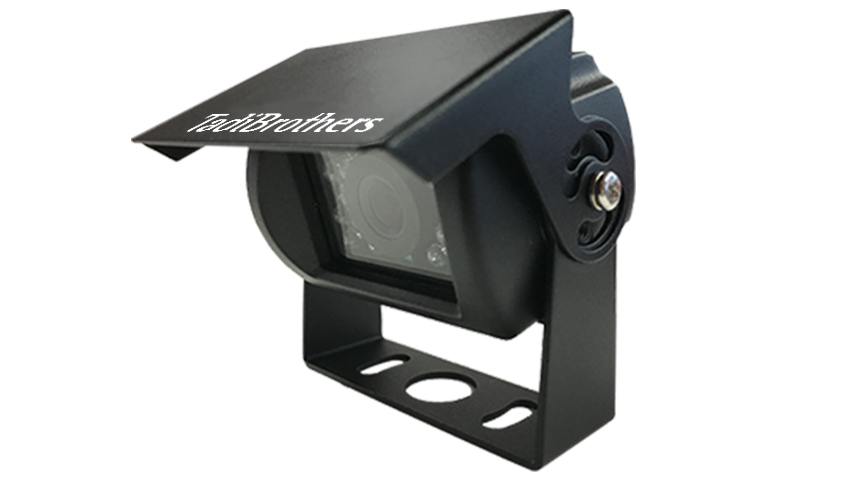
The TadiBrothers Skid Loader 1080p AHD Camera System is sold as a complete rear-view system. Its product listing includes a seven-inch monitor and installation instructions. The listing also states that the camera can remain on continuously while you work.
That continuous-view option can be useful when you want to monitor the rear area during regular operation. You should still follow safe operating practices and keep your surroundings under observation.
A Quick Buying Checklist
Still comparing different systems? Use this short checklist before you order.
- Confirm the camera works with your monitor.
- Check your machine’s required power specifications.
- Review the camera’s weather protection rating.
- Check the viewing angle and image resolution.
- Compare wired and wireless installation needs.
- Measure the cable route before buying.
- Check the monitor size and mounting space.
- Review included parts and installation instructions.
- Check warranty and support information.
- Compare the full cost, not just the camera price.
This takes only a few minutes, but it can prevent a poor fit.
What Makes the TadiBrothers System Worth Considering?
TadiBrothers offers a Skid Loader 1080p AHD Camera System for rear-view monitoring. The product includes a seven-inch monitor and is presented for construction sites and warehouse use.
The product page also states that the camera can remain on continuously. Installation instructions and diagrams are included with the system.
Those features make it relevant for operators who want a complete rear-view setup. You can review the Skid Loader camera system and its current specifications before deciding if it fits your machine.
If you are comparing systems, focus on your own operating needs first. Then compare those needs against each product’s verified specifications.
Choose Based on Your Machine, Not Just the Price
A good camera system should fit the way you actually use your skid steer. Start with visibility, then check durability, compatibility, installation, and total cost. This approach helps you avoid paying for features that do not matter to your work.
The right system should also be practical after installation. You should know how to clean it, check the cables, and confirm the image before work begins. Those small habits can keep the system useful over time.
Before you place the order, ask one simple question: Does this camera give you the view, fit, and features your skid steer actually needs?
Frequently Asked Questions
Can You Install a Backup Camera on Any Skid Steer?
Many skid steers can use aftermarket camera systems, but compatibility varies. Check the power requirements, mounting space, monitor, and cable route first. You should also review the manufacturer’s compatibility information before ordering.
Is a Wired or Wireless Camera Better for a Skid Steer?
Both options can work, depending on your machine and installation needs. Wired systems need cable routing but provide a direct physical connection. Wireless systems reduce video cabling but depend on reliable signal performance.
What Camera Resolution Should You Choose?
Higher resolution can provide more detail in the displayed image. Many current heavy-equipment camera systems use 1080p imaging. Still, camera placement, screen quality, and lighting also affect the final view.
Where Should You Mount a Skid Steer Camera?
Choose a location that gives you a useful rear view. The camera should stay clear of moving parts and avoid easy impact points. You should also keep the lens accessible for regular cleaning.
Can You Leave a Skid Steer Camera On Continuously?
Some systems support continuous viewing, while others use reverse-triggered operation. Check the product specifications before assuming either setup. The TadiBrothers Skid Loader system states that its camera can remain on continuously.
Does a Backup Camera Replace Operator Safety Checks?
No, a camera should only provide an additional view. It cannot show every hazard around a skid steer. Continue following your machine’s operating procedures and workplace safety rules.