
A backup camera for Chevy Express gives you a clearer view of what is directly behind the van, right where mirrors tend to fall short. That matters even more on a cargo van, where the rear windows can be small, blocked by equipment, or missing entirely depending on the configuration.
If you have ever backed a windowless van toward a loading dock or squeezed into a tight alley, you already know how fast rear visibility becomes a real problem.
Why Chevy Express Vans Can Benefit From a Backup Camera
The Express has a big, boxy rear end to begin with. Add shelving, tools, or cargo, and whatever view you had back there shrinks even further.
A camera gives you another angle to work with while reversing, showing you areas your mirrors and rear windows simply can’t reach. That doesn’t replace checking your surroundings, using your mirrors, or getting out to look when you are unsure. It just adds one more piece of information when you are maneuvering somewhere tight.
How a Chevy Express Backup Camera Works
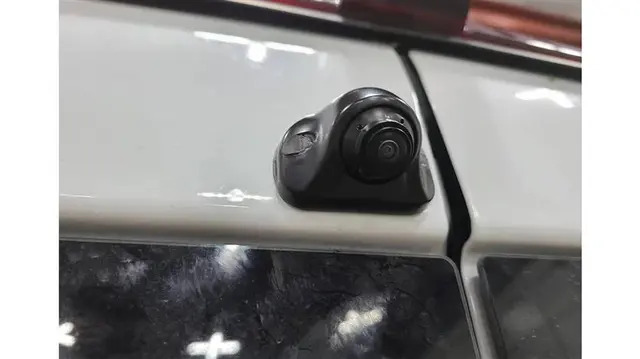
These systems use a few different mounting positions and setups. One common approach puts the camera into or near the high-mounted third brake light.
That high position gives you a useful view over cargo and equipment that might otherwise be in the way. Compatibility still depends on the specific camera and your van’s body configuration, though, so don’t assume every third-brake-light camera fits your Express without checking first.
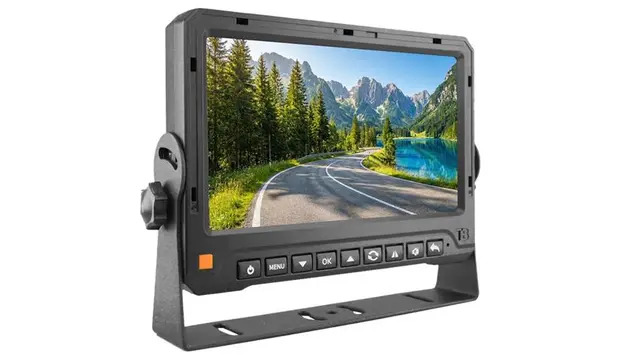
Depending on the system, the camera sends video to the monitor either through a cable or through a digital wireless transmission. Wireless systems still need a power connection for the camera.For the display side, you might choose between a dedicated monitor, a clip-on or replacement mirror monitor, or another compatible screen.
Mirror Monitor or Standalone Screen?
Which display works best really comes down to how you want your cab arranged.
A mirror-style display keeps the camera image somewhere you are already looking, and cuts down on the need for a separate screen cluttering the dash. Some clip right over your existing mirror; others are built as full replacements.
A standalone monitor, on the other hand, gives you more freedom over placement and sometimes a bigger viewing area, depending on the model.
Neither one wins outright. Think about where your eyes naturally go while reversing, how much dash space you have got, and whether keeping your factory mirror intact matters to you.
What to Look for in a Chevrolet Express Backup Camera
Not every camera listed for a Chevy Express actually fits every van. Before you buy, check a few things:
- Model year and configuration. Confirm the camera is built for your specific Express, or compatible GMC Savana, setup.
- Mounting location. Third brake light, license plate area, surface mount, each one’s a different installation.
- Viewing angle. Wider shows more behind the van, but push too far and you start seeing distortion creep in.
- Low-light performance. If you are reversing at night or in dim loading areas often, check the actual low-light or infrared specs rather than trusting a label.
- Cable length. For a wired setup, make sure what’s included actually reaches your planned routing path.
- Monitor compatibility. Match the camera’s video format and connector to whatever screen or head unit you’re running.
What Installation Really Involves
This can be a manageable DIY project, though the real difficulty depends on your specific camera and van. A typical wired install means mounting the camera, running the video cable toward the cab, hooking up power, and connecting the feed to your display.
If you want the camera tied to your reverse circuit, you will also need the right reverse-trigger connection so the screen switches over automatically when you shift into reverse.
Don’t assume wire colors or power connections match across different Express model years or camera kits, because they often don’t. Pull up your van’s actual wiring info and verify before connecting anything, and go slow around doors, hinges, or anywhere airbags are nearby.
Once it is in, test everything from the driver’s seat. Check the image quality, reverse switching, camera angle, and how the cable’s routed before you trust the system day to day.
Chevy Express vs. GMC Savana: Does It Matter?
The Express and Savana are closely related, sharing a lot of the same underlying platform. That said, a camera built for one won’t automatically fit the other.
Compatibility still comes down to model year, body configuration, mounting location, connector type, and whatever display you are pairing it with. Shopping for a Savana? Check the manufacturer’s actual listed compatibility rather than assuming a shared platform means a guaranteed fit.
Is a Backup Camera Worth It?
For most Express owners, the benefit is pretty simple: better visibility while maneuvering. A camera makes it easier to judge the space behind the van when backing into a parking spot, a loading area, or a tight driveway, especially when the rear is loaded up with equipment or cargo.
For commercial use, it often comes down to how often the van is on the road and how much value you place on having that extra set of eyes. TadiBrothers carries backup camera systems in a range of configurations, including options built for commercial and larger vehicles. When you are comparing systems, look past the camera itself and check the mounting method, power needs, video connection, monitor compatibility, and whether it actually fits your van.
A Few Things Worth Double-Checking
Before ordering a Chevy Express backup camera, confirm:
- Your exact model year and vehicle configuration.
- Whether the mounting method actually matches your van.
- Whether the included cable reaches far enough for your install.
- Whether the camera and monitor share a compatible video connection.
- Whether you’ll need a separate reverse-trigger connection.
- Whether the weather resistance holds up for an exterior mount.
- Whether the package includes the monitor, wiring, and brackets you’ll need, or just the camera.
Bringing It All Together
A backup camera for Chevy Express adds real, useful rear visibility to a van where cargo, body design, and limited rear glass already make reversing harder than it should be.
The trick isn’t just grabbing anything labeled “Chevy Express.” Check the model year, mounting location, camera specs, wiring, and display compatibility first. Get that right, and the camera becomes one more tool alongside your mirrors and good judgment, not a replacement for either.