
A dump truck backup camera helps drivers see hidden areas during busy jobsite moves. Choose clear video, a strong mount, reliable power, and useful rear coverage. The right setup should match your truck’s size and daily work.
Picture your driver backing toward a gravel pile before sunrise. A loader moves nearby while workers cross the yard. The tall dump bed hides part of the space behind the truck. One clear camera view can help reveal a hidden obstacle.
But how do you choose the right setup for your fleet? These six tips explain what matters before you buy.
Why Does Your Fleet Need Better Rear Visibility?
Dump trucks work near heavy machines, workers, and narrow loading areas. Their tall beds create blind spots that mirrors cannot always cover. These hidden spaces make backing more difficult on crowded jobsites.
The NIOSH construction equipment visibility diagrams show blind areas around different truck models. Vehicle size and body shape affect what drivers can see. This makes camera placement important for every fleet.
A camera adds another view, but it cannot replace safe driving. Drivers still need mirrors, clear routes, and proper backing procedures.
Tip 1: Identify Your Truck’s Biggest Blind Spots
Before choosing equipment, check what your drivers cannot see. A rear camera may solve one problem while leaving others hidden. Your truck’s design and daily routes should guide the setup.
Start with the truck parked safely on level ground. Check visibility from the driver’s normal seating position. Keep the dump bed lowered during the first assessment. Use trained staff for any further checks near moving equipment.
Focus on these common blind spots:
- Behind the tailgate: Workers, barriers, and low objects.
- Rear corners: Equipment near tight turning areas.
- Passenger side: Areas outside the mirror’s clear view.
- Loading zones: Workers moving between trucks and loaders.
- Inside the bed: Material levels during loading operations.
The Indiana Department of Transportation provides a useful real-world example. Its camera project included views behind the truck and inside the bed. Each camera helped drivers monitor a different work area.
This shows why camera count should follow actual driving needs. You may need one rear camera or several views.
Tip 2: Choose Clear Video and Heavy-Duty Camera Features
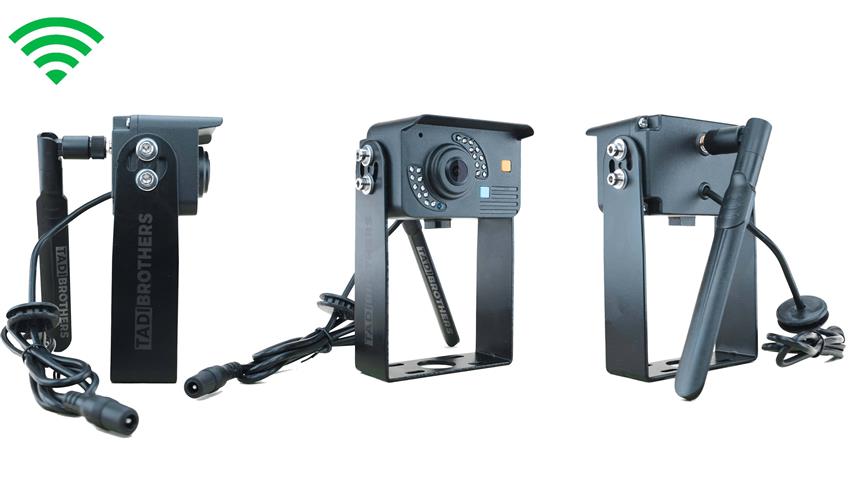
A dump truck backup camera must handle rough jobsite conditions. Dust, rain, vibration, and poor light can reduce visibility. A camera that looks clear indoors may struggle outside.
Start by checking image quality during normal driving conditions. A 1080p camera can show useful details on a compatible monitor. Still, resolution alone cannot guarantee a clear rear view.
Camera placement, lens quality, and screen brightness also affect visibility. You should compare these features before choosing a system.
Look for these important features:
- 1080p video: Helps show details when the system supports it.
- Night vision: Improves visibility during early or late shifts.
- Weather protection: Helps protect equipment from rain and dust.
- Wide viewing angle: Covers more space behind the truck.
- Strong mounting brackets: Help withstand regular truck vibration.
Imagine reversing through a dusty gravel yard after unloading. A dirty camera lens may hide a nearby concrete barrier. Even an expensive monitor cannot fix that blocked view.
TadiBrothers offers a Dump Truck 1080P Backup Camera System with a seven-inch monitor. The system uses digital wireless video and supports night viewing. Its monitor also includes automatic dimming for changing light conditions.
Check the selected kit’s specifications before purchasing for your fleet.
Tip 3: Find the Best Camera Mounting Position
Camera placement matters just as much as image quality. A poorly mounted camera can leave important blind spots hidden. It may also face damage from moving truck parts.
For dump trucks, the tailgate needs special attention. The camera must remain clear of hinges and moving sections. Mud, loose gravel, and debris can also affect exposed equipment.
Consider a truck that unloads gravel several times daily. A camera mounted near the tailgate may face repeated damage. A protected mounting position can help reduce that risk.
Before installing, check these details:
- Rear visibility: The camera shows the main backing path.
- Tailgate clearance: Moving parts cannot strike the camera.
- Cable protection: Wires stay away from heat and sharp edges.
- Mounting height: Drivers can see nearby ground obstacles.
- Lens access: Cleaning remains easy and safe.
Have a qualified installer confirm the mounting location. Never work beneath a raised dump bed without approved supports.
After installation, test the view in a controlled area. Use visible markers to check how distance appears onscreen. Repeat the test during daylight and low-light conditions.
These checks help drivers understand the camera’s actual viewing limits.
Tip 4: Choose Between Single and Multi-Camera Systems
Not every dump truck needs four cameras. Some trucks only need better visibility directly behind them. Others require additional views around crowded loading areas.
Start with your biggest visibility problem. Then add cameras only where they provide useful coverage.
| Camera Setup | Best Use | Main Benefit |
| Single camera | Basic rear visibility | Shows the area behind the truck |
| Two cameras | Rear plus one side | Covers an extra blind spot |
| Three cameras | Rear and both sides | Helps during tight turns |
| Four-camera system | Multiple work areas | Provides broader camera coverage |
OSHA explains that multiple views may help on some dump trucks. The right number depends on the vehicle and worksite.
Monitor features also deserve attention. A split-screen display can show several views together. However, smaller images may become harder to read.
The TadiBrothers Dump Truck 1080P Backup Camera System supports up to four cameras. Its seven-inch monitor offers different viewing options. Confirm which cameras and accessories come with your selected package.
Do You Need Video Recording?
Some fleet owners want footage after an accident or dispute. However, live viewing and video recording serve different purposes.
A rear-view monitor may display video without saving it. Recording requires compatible hardware and storage features. Check whether DVR recording is included before buying.
For basic reversing, live viewing may meet your needs. For incident reviews, consider a system with verified recording support.
Tip 5: Check Wireless Range, Power, and Compatibility
Your dump truck backup camera must work reliably on the actual vehicle. Truck size and construction can affect wireless reception. Power requirements also differ between truck models.
Wired systems send video through physical cables. Wireless systems reduce long video cable runs but still need power. Both options require proper installation and testing.
Before buying, check these details:
- Power compatibility: Confirm the required voltage for each truck.
- Wireless reception: Test the signal with nearby equipment running.
- Camera connections: Check compatibility with the selected monitor.
- Mounting hardware: Make sure brackets fit your vehicle.
- Viewing modes: Confirm reverse-only or continuous operation.
Many fleet owners ask about 12V and 24V compatibility. Never assume a camera supports both electrical systems. Check the manufacturer’s approved input range before installation.
Wireless reception also needs testing before a fleet-wide purchase. A signal may work differently on two truck models. Test the camera during normal work conditions.
This small step can prevent costly installation problems later.
Tip 6: Train Drivers and Maintain Your Camera Systems
A good camera needs regular checks to remain useful. Dusty lenses, loose mounts, and damaged wires can reduce performance. Drivers should know how to spot these problems.
The OSHA backover safety guidance explains the importance of clear signals and spotter communication. Drivers should stop when they lose sight of their spotter. Cameras should support established backing procedures, not replace them.
Imagine your driver backing beside a large loader. The spotter suddenly moves outside the driver’s view. The driver should stop until safe communication returns.
Make these checks part of your fleet routine:
- Daily: Clean the lens and check the video feed.
- Weekly: Inspect brackets, cables, and visible connections.
- After repairs: Test camera operation before regular use.
- During training: Practice using mirrors and camera views together.
- When faults appear: Report problems before relying on the camera.
Use the same checklist across your fleet. This helps drivers recognize faults and report them quickly.
Standard camera controls can also simplify training. Drivers moving between trucks will face fewer unfamiliar settings.
Which TadiBrothers Camera System Fits Your Fleet?
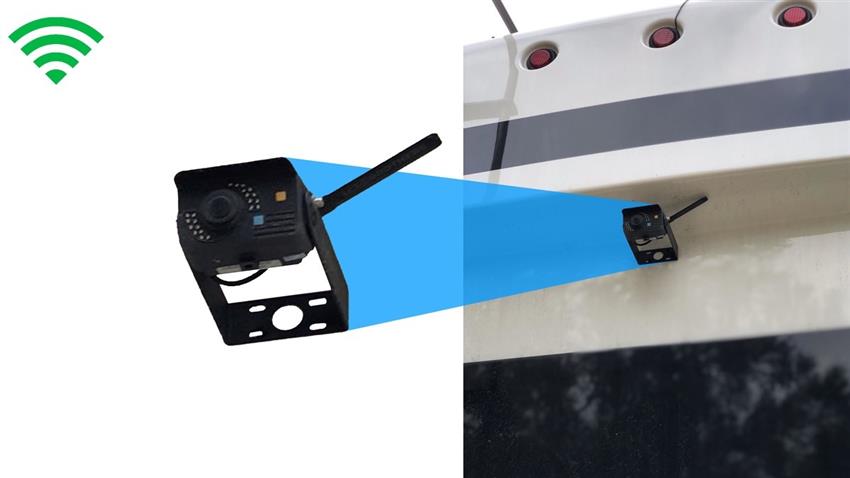
The TadiBrothers Dump Truck 1080P Backup Camera System suits buyers seeking wireless rear visibility. It includes a seven-inch monitor and supports additional compatible cameras. The system also offers reverse-triggered and continuous-view options.
For a truck with one major rear blind spot, start with basic coverage. If side visibility remains limited, consider adding compatible cameras. Check the complete kit before making your final choice.
Fleet owners should also compare replacement parts and installation needs. A system that’s easy to maintain can reduce service delays. Consistent equipment may also make driver training easier.
Before ordering, confirm camera compatibility, included accessories, and product support. Choose equipment that matches your fleet’s actual work conditions.
Give Every Driver a Clearer View
The right dump truck backup camera should address your fleet’s biggest blind spots. Focus on image quality, camera placement, compatibility, and daily maintenance. Train drivers to use these views alongside established safety procedures.
A reliable system should make reversing easier without creating false confidence. When your next truck enters a crowded loading zone, will its driver see every critical area?
Frequently Asked Questions
How Many Backup Cameras Does a Dump Truck Need?
Some trucks only need one rear camera. Larger trucks may benefit from additional side views. The best setup depends on vehicle blind spots and daily operations.
Are Wireless Backup Cameras Reliable for Dump Trucks?
Wireless systems can provide reliable video with good reception. Steel bodies and nearby equipment may affect signal quality. Test the system on your truck before installation.
Do Dump Truck Backup Cameras Record Video?
Some camera systems offer recording, while others only show live video. DVR recording requires compatible hardware and storage. Check the product specifications before purchasing.
Can a Backup Camera Replace a Spotter or Reverse Alarm?
A camera does not automatically replace required safety measures. Applicable rules depend on visibility, vehicle use, and worksite conditions. Follow OSHA requirements and your site’s backing procedures.