
Only about 15% of 360-degree car security cameras actually deliver the seamless all-around coverage that the name implies. The rest are either single-lens cameras with a wide-angle lens marketed as 360, systems missing one or two camera positions, or parking aids that don’t record anything at all. The gap between what the label says and what the product does has cost a lot of buyers a lot of money.
This guide exists to close that gap. It covers how each type of system works, which system actually matches your situation, what to look for in specs, how long installation really takes, and why the GPS and footage quality you choose today may determine whether your insurer takes you seriously after an incident.
The car electronics range at TadiBrothers covers the aftermarket side of this, from 2-channel dash cams to full surround-view systems. But the right choice depends on understanding what you’re actually buying, and that’s what comes first.
Two Systems, One Name: The Confusion That Costs Buyers Money
There are two fundamentally different products that share the name ‘360-degree car camera’ and most buyers don’t discover the difference until after they’ve installed the wrong one. One is a parking aid. The other is a recorder. Both are useful. They serve different purposes and getting them confused is an expensive mistake.
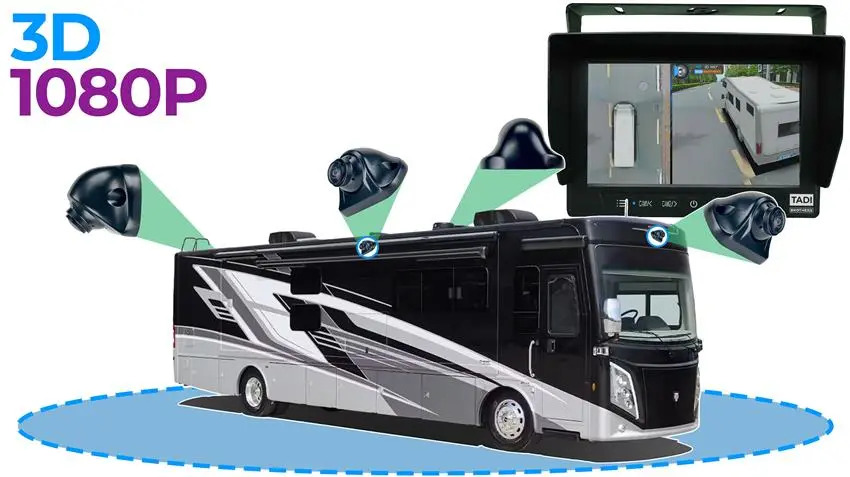
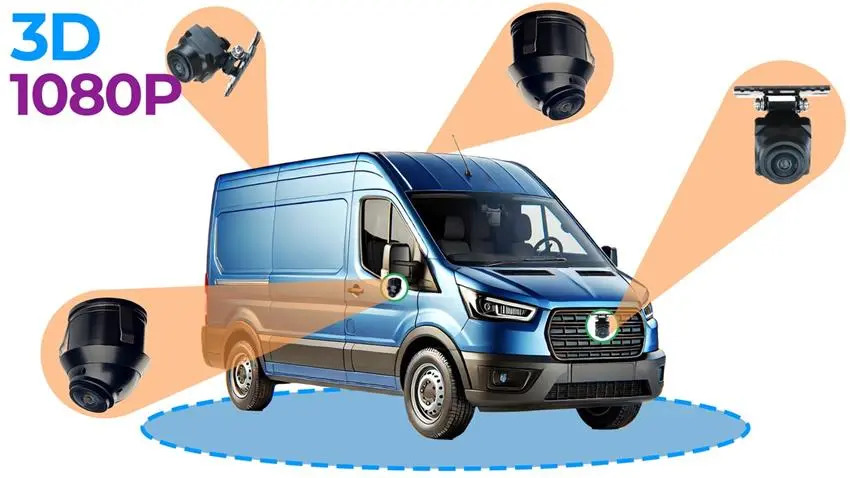
A surround-view parking system uses four cameras at the vehicle’s corners to generate a live bird’s-eye composite image on your dashboard screen while you maneuver. Think of it as a real-time overhead view of your vehicle in relation to everything around it. It’s exceptional for parking, for navigating tight spaces, and for eliminating the blind spots at each corner that every conventional mirror leaves uncovered. But most surround-view systems don’t record footage continuously. The person who backs into your parked car while you’re in the shop and drives away won’t be captured on anything.
A 360-degree dash cam record. That is its core function. It captures footage from multiple angles, stores it on a memory card with loop recording, and protects clips using a G-sensor when an impact is detected. The ‘360-degree’ label on a dash cam usually refers to wide-angle or multi-channel coverage rather than a seamless stitched view. You get evidence. You don’t always get the live overhead parking aid.
| Factor | Surround-View System | 360 Dash Cam |
| Primary purpose | Parking aid, live composite view | Recording incidents while driving |
| Camera count | 4 cameras, one at each corner | 1 to 4 channels, front-focused |
| Records footage | Usually no, live view only | Yes, continuous loop recording |
| Install complexity | Moderate, 4 cable runs | Low to moderate, 1-2 mount points |
| Best for | Blind spot parking, manoeuvrability | Insurance evidence, rideshare safety |
| Night recording | Limited, live view only | Yes, IR night vision active |
| Parking mode | Some models, varies | Yes, with hardwire kit |
The honest answer for most drivers who want comprehensive protection is both systems working together. A surround-view system for parking and blind-spot awareness, and a recording dash cam for incidents while driving and overnight security. They’re not substitutes for each other.
How a 360 Degree Car Security Camera System Actually Works
Whether you’re looking at a surround-view system or a multi-channel recording setup, the underlying hardware is a family of wide-angle cameras doing different jobs on different activation triggers.
Each camera captures a wide-angle view, typically 120 to 180 degrees, of its specific quadrant. In a surround-view system, a processor takes four overlapping feeds and stitches them into a single composite overhead image using calibration data about the vehicle’s dimensions. In a dash cam setup, each channel records independently to the memory card.
The activation logic differs. Surround-view systems activate when you shift into reverse or drop below a set speed. Dash cams record continuously from ignition-on, with parking mode extending recording through a hardwire connection or built-in power source. Both systems use a G-sensor to lock footage clips automatically when an impact is detected, preventing loop recording from overwriting them.
| The stitching quality in a surround-view system depends entirely on calibration. If you skip the calibration procedure after install, the overhead composite image will have misaligned seams and gaps at each camera join. Most quality aftermarket systems include a calibration mat and step-by-step guidance. This is not optional. |
4-Channel vs 2-Channel vs Single Lens: Coverage, Cost, and Install Reality
The channel count tells you how many independent camera feeds the system manages at once. More channels mean more coverage but also more cabling, more mounting points, more install time, and higher cost. The table below gives the honest picture for each configuration, including how long installation actually takes.
| Setup | Cameras | Coverage | Best For | Install |
| 2-channel | Front + rear | Road ahead + road behind | Most everyday drivers | Easy, 2 hrs |
| 3-channel | Front + rear + interior | Road + cabin | Rideshare, families | Moderate, 3 hrs |
| 4-channel | Front, rear, left, right | True 360-degree perimeter | Full blind-spot cover | Advanced, 4+ hrs |
| Single fisheye | Windshield wide-angle only | Wide front, partial sides | Budget entry point | Easy, 1 hr |
A 4-channel system covering front, rear, left, and right is the closest thing to genuine perimeter security in a recording format. Nothing enters any of the four camera frames without being captured. But four cable runs to four corners of a vehicle is a significant install. Budget an afternoon minimum, more if you haven’t done automotive wiring before.
For most everyday drivers, a 2-channel front and rear setup handles the incidents that actually result in insurance claims. Front footage catches what happens in traffic. Rear footage covers parking incidents and rear-end collisions. The sides are a gap, and whether that gap matters depends on where you drive and park.
Night Vision: What the Specs Actually Mean
Most car incidents happen in low light. Parking lots at dusk. Residential streets at night. Garages. A camera that performs well in daylight and produces useless grey noise at 9pm is not a security camera regardless of what the packaging says.
The specifications that tell you about real low-light performance aren’t always prominent in listings. Resolution numbers are easy to market. Aperture size and illumination type are buried in spec sheets because they’re harder to turn into a headline.
| Technology | How It Works | Performance |
| Infrared (IR) | Invisible IR LEDs light the scene | Excellent in dark car parks and garages |
| Starlight sensor | Large sensor captures ambient light | Good on lit streets, weaker in full dark |
| WDR / HDR | Balances bright and dark zones in frame | Best for mixed light: headlights, tunnels |
| F1.8 aperture | Wide lens opening captures more light | Strong overall, pairs best with IR |
The combination to look for is F1.8 or wider aperture paired with infrared LEDs. The wide aperture captures more ambient light and the IR provides active illumination the sensor can use in complete darkness. This is what gives you a readable licence plate in an unlit car park rather than a bright smear against black. If you see ‘Super Night Vision’ in a listing without a specific aperture figure and IR LED count, treat it with healthy skepticism.
Parking Mode and 24/7 Recording: What It Needs to Actually Work
Parking mode is the feature that monitors your vehicle while you’re not in it. It’s also the feature most buyers misunderstand until they discover the gap after installation. Parking mode doesn’t activate automatically on most systems. It needs power when the ignition is off, and getting that power requires either a hardwire kit or a system with its own power source.
A hardwire kit connects the camera to the vehicle’s fuse box through a fused circuit that stays live when the ignition is off. Quality kits include a low-voltage cutoff that stops drawing power if the car battery drops below a threshold, preventing a dead battery the next morning. Installation involves running a power cable to the fuse box, typically 30 to 60 minutes for someone familiar with automotive wiring.
- Motion-triggered mode: records a clip when movement is detected nearby. Storage-efficient, may miss fast events.
- Time-lapse mode: captures one frame per few seconds across the entire parked period. Very efficient on storage.
- Continuous parking mode: records exactly as while driving. Most storage-intensive, most complete.
- G-sensor trigger: activates and locks a clip when the accelerometer detects a physical impact. Most targeted.
| A hardwired 4-channel system with continuous parking mode in an urban environment will fill a 128GB card in roughly 3 to 5 days depending on resolution. A high-endurance SD card rated for dash cam use is not optional in this setup. Standard phone storage cards fail under continuous write cycles within weeks. |
360 Degree Car Security Camera with Wi-Fi: Why It Changes the Experience
A 360 degree car security camera with Wi-Fi is not a gimmick. It changes how usable the footage actually is in the situations where you need it most, which are usually situations where you don’t have time to remove an SD card and find a computer.
Without Wi-Fi, accessing footage means removing the SD card, inserting it into a reader, locating the correct clip in a folder potentially containing hundreds of files, and transferring it to a device. That’s manageable when you have time. It’s frustrating when you’re standing in a car park ten minutes after a collision trying to get footage before the other driver leaves.
With Wi-Fi, the camera creates a local hotspot that your phone connects to. The companion app shows your footage library, lets you preview clips without downloading the full file, and lets you save and share the relevant clip in under two minutes. Some systems add live view access from the app, letting you see what each camera is showing at any time.
- Wi-Fi direct (hotspot): camera creates its own network. Fast, private, works anywhere. Most common setup.
- Cloud Wi-Fi: uploads footage automatically when your car is near your home network. Useful for overnight parking mode clips.
- 5GHz Wi-Fi: faster transfer speeds than standard 2.4GHz. Worth having for 4K footage on multi-channel systems.
- 4G LTE (fleet/commercial): camera has its own SIM card for remote live view from anywhere. Higher cost, subscription usually required.
Who Needs Which System? Match Your Situation to the Right Setup
The most useful question to ask before buying isn’t ‘what’s the best 360 camera?’ It’s ‘what’s the best camera for my specific situation?’ The answer varies considerably depending on how you use your vehicle, where you park it, and what you’re primarily trying to protect against.
| You Are… | Best System | Key Features Needed | Channels |
| Everyday commuter, city driver | 2-channel wired dash cam | 1080P, night vision, GPS | 2-channel |
| Rideshare / Uber / Lyft driver | 3-channel with interior cam | Cabin monitor, Wi-Fi, GPS | 3-channel |
| Parent (teen driver) | 2-channel + GPS tracking | GPS alerts, impact notif. | 2-channel |
| Fleet manager | Multi-cam + cloud storage | AI alerts, remote access | 4+ channel |
| Street parker / urban dweller | 4-channel with parking mode | 24/7 record, hardwire kit | 4-channel |
| Truck / SUV / large vehicle | 4-channel surround-view | Wide-angle, blind-spot cover | 4-channel |
| RV / trailer owner | Wireless rear cam system | Wireless, long range signal | 2-channel |
Rideshare drivers have a distinct set of requirements that general-purpose cameras don’t always meet. The cabin camera matters as much as the road cameras. A 3-channel system covering front, rear, and interior gives both the evidence protection for traffic incidents and the cabin documentation that matters in passenger disputes or damage claims. The Wi-Fi and GPS combination is important here too: a GPS-tagged clip timestamped with route data is considerably more useful than footage alone when resolving a dispute with a passenger over what happened and where.
Fleet managers need a different layer entirely. The AI driver behaviour monitoring in commercial-grade systems, detecting harsh braking, rapid lane changes, phone use, and driver fatigue, adds accountability and insurance risk management that a standard consumer dash cam doesn’t provide. Cloud storage and real-time access means footage is available immediately after an incident without waiting for a driver to return the vehicle.
Legal Protection and Insurance: Why Your Camera Choice Matters More Than You Think
Footage from a car security camera can be the difference between a successful insurance claim and a disputed one where both parties point fingers and nothing gets resolved in your favour. But not all footage is equally useful to an insurer or in a legal context.
The three factors that determine whether your footage is actually usable in a claim are resolution, GPS data, and timestamp accuracy. A low-resolution clip that shows a blurry image of something dark hitting your rear bumper is consistent with an incident but doesn’t prove anything specific. A 1080P clip showing a clear vehicle, a readable partial plate, your speed at the moment of impact, and your GPS location with timestamp data is evidence.
GPS integration is not a luxury feature. In a rear-end collision, your GPS track showing constant speed, no sudden braking or swerving, and the location matching your stated route corroborates your account in a way that footage alone can’t. In a parked car incident where someone damages your vehicle and drives away, GPS shows you were stationary. These details matter when insurers investigate.
- 1080P minimum for evidence use. Lower resolutions produce footage that’s consistent with events but rarely specific enough to identify a vehicle clearly.
- GPS + speed data. The combination of location, speed, and timestamp makes footage verifiable and corroborative.
- G-sensor event lock. Automatically protects the relevant clip from being overwritten by loop recording.
- Night vision quality. Most incidents happen in low light. F1.8 aperture + IR LEDs is the minimum combination for usable night footage.
- Continuous parking mode. Hit-and-run incidents in parked vehicle scenarios require power-on recording while the ignition is off.
| Some insurance companies in the US now offer premium discounts for vehicles equipped with qualifying dash cam systems, particularly for rideshare drivers and fleet vehicles. Check with your insurer before purchasing. The discount on an annual premium can partially or fully offset the cost of the camera within the first year. |
Installation Reality: Time, Difficulty, and What You’ll Actually Need
Most installation guides are optimistic. ‘Easy installation’ in a product listing means easy relative to other car electronics, not easy in any absolute sense. A 4-channel wired system installed properly, with cables routed behind trim panels and a hardwire kit connected to the fuse box, is a meaningful afternoon of work.
The table below gives honest time and difficulty ratings based on each system type. These assume a single person working methodically with basic automotive knowledge. No prior experience? Add 50% to the time estimates and consider whether a professional installation at $100 to $200 is better value than a day of your time and the risk of a job that needs redoing.
| System Type | Time Estimate | Difficulty | Tools Needed | Hardwire Required? |
| 2-channel windshield cam | 1 to 2 hours | Easy | Pry tool, trim clips | Optional (parking mode) |
| 3-channel with interior | 2 to 3 hours | Moderate | Pry tool, extension cable | Optional |
| 4-channel full perimeter | 4 to 6 hours | Advanced | Pry tool, drill, cable loom | Yes, for parking mode |
| Surround-view system | 4 to 8 hours | Advanced | Drill, calibration mat, screen | Yes |
| Wireless rear camera | 1 to 2 hours | Easy | Basic hand tools | No |
The tools that make a real difference on most install jobs: a plastic pry tool set for removing trim panels without cracking clips, a pick for routing cables behind door seals, and a multimeter for verifying fuse box connections. These tools cost less than $30 combined and the difference between using them and not using them is the difference between a clean, invisible install and visible cable runs that lift every time you open a door.
Wired vs Wireless: Which Makes More Sense for Your Vehicle
Wired systems run a physical cable from each camera to the control unit or monitor. The signal is stable, the connection doesn’t drop in high RF environments, and there’s no latency in the live view that matters for a surround-view parking aid. The trade-off is installation complexity that scales with the number of cameras.
Wireless systems transmit a radio signal between each camera and the receiver. Installation is substantially simpler because you’re only routing a power wire to each camera rather than both power and data cables. For vehicles where running cables behind trim panels is difficult, for trailers, RVs, or temporary setups, wireless removes the main installation barrier.
The limitation of wireless for a surround-view parking system specifically is latency. Even a fraction-of-a-second delay in a live parking view is noticeable when you’re inching toward a wall. For recording purposes this delay is irrelevant. For live parking aid use, wired is the better choice where the install is feasible. TadiBrothers’ car electronics range covers both wired and wireless options across different vehicle types and use cases.
Aftermarket vs OEM: The Honest Cost Comparison
Factory surround-view systems on new vehicles are expensive when something goes wrong. A single OEM camera module on a modern vehicle can cost $300 to $800 at a dealer before labour. If a calibration procedure is required after replacement, that’s additional time at a dealer rate.
| Option | Cost Per Unit | Full System | Installation |
| OEM dealer replacement | $150 to $400 | Per camera | $100 to $300 labour |
| Independent mechanic (OEM) | $80 to $200 | Per camera | $60 to $150 labour |
| Aftermarket 2-channel kit | Kit price only | $40 to $120 | $0 DIY |
| Aftermarket 4-channel kit | Kit price only | $80 to $200 | $0 DIY if capable |
| Professional install (after.) | Kit + labour | Kit + $100 to $200 | Professional rate |
The capability gap between a quality aftermarket system and an OEM equivalent is much smaller than the cost gap suggests. The main practical advantage of OEM parts is seamless integration with the factory infotainment system on vehicles that already have one. For vehicles without factory cameras, aftermarket is the only option and the performance is comparable.
A well-installed 4-channel aftermarket surround-view system provides the same bird’s-eye composite parking view as a factory system. The display is separate from the factory screen rather than integrated with it, which is a visual difference rather than a functional one. TadiBrothers carries systems for vehicles that were never offered with factory surround-view and need the full setup installed from scratch.
7 Features That Actually Determine Whether a Camera Does Its Job
There are many specifications that sound significant in a product listing and make almost no practical difference in real-world security use. Resolution numbers, brand names, and box design are marketing. The following seven features are what determine whether the camera captures usable footage when something actually happens.
- Resolution: 1080P minimum for evidence quality. 4K on the front camera improves licence plate readability significantly.
- Night vision: F1.8 or wider aperture plus IR LEDs. Both. Not one or the other.
- GPS: Logs location, speed, and route. The difference between footage and evidence.
- Parking mode: Hardwire kit or built-in power. Continuous or motion-triggered. Know which you need before you buy.
- Wi-Fi: App access to footage. 5GHz is faster for multi-channel 4K systems.
- SD card compatibility: High-endurance cards rated for continuous write cycles. Standard phone cards fail in weeks under continuous dash cam use.
- G-sensor sensitivity: Too sensitive and it locks clips from road bumps. Too low and it misses real impacts. Look for adjustable sensitivity.
The camera you choose doesn’t change what happens to your car. It determines whether you can prove what happened to anyone who matters afterward. Your insurer. A police officer taking a report. A parking lot operator reviewing their own footage. The evidence you have, or don’t have, is the difference between those conversations going your way.
Most people buy a camera after their first incident without one. The logic changes quickly when you’re standing in a car park trying to describe a vehicle you didn’t get the plate of to a police officer who needs something more than your description. TadiBrothers’ car electronics range has the right system for every situation in that buyer table above. The question is which one applies to you.
Here’s the one to sit with: if your car was damaged overnight tonight in the place where you usually park it, what would you actually be able to prove tomorrow morning?
FAQs
1. What’s the difference between a surround-view system and a 360-degree dash cam?
A surround-view system uses four cameras to create a live bird’s-eye parking image. It doesn’t record. A 360-degree dash cam records footage from multiple angles for evidence and insurance purposes. Most surround-view systems don’t record continuously; most dash cams don’t produce a stitched overhead view.
2. Do 360-degree car cameras actually record when the car is off?
Only in parking mode, and only with either a hardwire kit connected to the fuse box or a built-in battery or supercapacitor. Without one of these, the camera turns off with the ignition. Hardwired continuous parking mode is the most reliable for overnight security. Built-in batteries typically last 30 to 90 minutes.
3. What is a 360 degree car security camera with Wi-Fi and why does it matter?
It means the camera creates a local Wi-Fi hotspot your phone connects to. You can view, preview, and download footage clips directly from the app without removing the SD card. On systems with 5GHz Wi-Fi, large 4K clips transfer in under a minute. It’s a significant quality-of-life feature for people who need footage quickly after an incident.
4. How many channels do I actually need?
2-channel for basic evidence and incident recording on most vehicles. 3-channel if you drive rideshare or want cabin monitoring. 4-channel for full perimeter recording with no blind spots. A 4-camera surround-view system for parking aid use. Your budget and install appetite are also factors.
5. Will a car security camera help with my insurance claim?
Yes, significantly, when the footage is high resolution, GPS-tagged, and timestamped. Insurers look at footage as corroborative evidence rather than definitive proof, but GPS-verified route data combined with clear video of an incident changes the weight of a claim considerably. Some US insurers now offer discounts for vehicles with qualifying dash cam systems.
6. Can I install a 360-degree car camera myself?
Yes for most 2-channel and wireless systems, which take one to two hours with basic tools. A 4-channel wired system or full surround-view setup is Advanced difficulty and takes four to eight hours. If you’re not comfortable routing cables behind trim panels or working with a fuse box, professional installation at $100 to $200 is worth considering.
7. What SD card do I need for a 360-degree dash cam?
A high-endurance card rated specifically for continuous-write use. Standard cards designed for phones or cameras fail quickly under the constant read-write cycle of a dash cam. Look for cards marketed for dash cam or security camera use, minimum 64GB for a 2-channel system and 128GB for a 4-channel setup.
8. Is aftermarket as good as OEM for 360-degree camera systems?
For vehicles without factory cameras, aftermarket is the only option and quality aftermarket systems deliver comparable detection coverage and image quality. The main difference is that an aftermarket system uses its own display rather than integrating with the factory infotainment screen. TadiBrothers’ car electronics range includes systems designed specifically for retrofit installation on any vehicle.